
Written by: Matt Beucler, CEO, Plura AI
Updated September 2026
Key Takeaways
- Call center automation examples are production workflows where AI handles specific tasks such as answering, routing, summarizing, or following up within a defined sequence of trigger, AI action, systems touched, and human-handoff trigger.
- Production specificity matters because operators need to see workflow logic. Workflows perform when the sequence, systems touched, and human-handoff trigger are designed before launch.
- Each automation example below calls out the workflow sequence, human-handoff trigger, and failure mode so you can see how it behaves in production.
- Plura AI runs these automations on an FCC-licensed carrier with a stateful conversation database across voice, SMS, RCS, and webchat. Real-time DNC scrubbing before dial and branded caller ID issued at the carrier level are built into the platform.
- See these workflows running in production and review a workflow build end to end with a live demo from Plura.
Why Production Specificity Matters for Call Center Leaders
Operators evaluating automation need to see workflow logic instead of a generic feature list. The industry standard for first contact on an inbound lead is 47+ hours, yet contacting a lead within 5 minutes makes them up to 100x more likely to connect, and a 60-second response lifts conversions by 391 percent.3 At the same time, 88 percent of outbound effort goes unanswered.3
Workflows that perform at volume share one trait. The workflow sequence, systems touched, and human-handoff trigger are designed before launch. Integration failure is one of the most common reasons call center automation fails to deliver ROI, such as when the virtual agent cannot write to the CRM, the post-call summary does not populate the ticket system, or the routing logic cannot access real-time queue data.4 Because these failures often surface only under load, the escalation path has to be designed before the automation flow goes live, so the first bad outcome at volume does not become the trigger for redesign.
Walk through these patterns in your own environment with a live Plura demo focused on production workflows.
What Are Examples of Call Center Automation?
The 12 examples below focus on five elements in practice: the trigger, the AI action, the systems touched, the human-handoff trigger, and the failure mode.
- AI Receptionist / Inbound Answering. This is the highest-volume entry point most operators build first. Trigger: inbound call. AI action: answers on first ring, qualifies, books or routes. Systems touched: voice agent, calendar, CRM. Human-handoff trigger: caller requests a person or intent falls outside workflow. Failure mode: no after-hours call answering means missed calls become competitor bookings. Plura’s AI voice agent answers every call 24/7 on its FCC-licensed carrier.
- Intelligent Call Routing by Intent. This workflow routes callers by spoken intent instead of menu selection. Trigger: caller states need in natural language. AI action: classifies intent and matches to agent skill. Systems touched: voice agent, CRM, routing engine. Human-handoff trigger: low confidence after two attempts. Failure mode: generic routing sends callers to the wrong department, which increases transfers and abandonment. Conversational AI reduces IVR misrouting by up to 90 percent by letting customers state their need in natural language.3
- Automated Call Summaries and CRM Write-Back. This is the after-call work reduction that often funds the business case. Trigger: call ends. AI action: transcribes, summarizes, and writes structured notes to CRM. Systems touched: voice agent, CRM, ticketing. Human-handoff trigger: none, because this flow runs fully automated. Failure mode: if the AI is not trained on your disposition taxonomy, it generates generic summaries agents must correct. Plura’s CRM integration connects to a broad integration library across CRM, calendars, payments, and document signers. Fifty-four percent of calls require after-call work, and automated wrap-up is consistently one of the fastest use cases to deliver measurable ROI.3
- Missed-Call Recovery and Speed-to-Lead. This workflow connects directly to Plura’s under-5-second first contact capability. Trigger: missed call or form fill. AI action: texts the lead within seconds, qualifies, and live-transfers warm buyers. Systems touched: SMS agent, voice agent, CRM. Human-handoff trigger: lead qualifies and requests a call. Failure mode: slow follow-up means leads go cold in minutes. Organizations deploying AI for speed to lead see connection rates increase by 3x to 5x.3
- Appointment Scheduling and Confirmation. This is often the highest-ROI example for appointment-driven verticals. Trigger: caller requests appointment. AI action: checks calendar, books, and sends confirmation. Systems touched: voice agent, calendar, SMS. Human-handoff trigger: complex scheduling logic or reschedule request. Failure mode: no-shows erode ROI. Plura supports healthcare and other appointment-driven teams with up to 40 percent improvement in no-shows.3
- Automated QA and Compliance Monitoring. This workflow shifts operations from 1 percent call sampling to 100 percent coverage. Trigger: call ends. AI action: scores every interaction against quality and compliance criteria. Systems touched: voice agent, QA platform, compliance dashboard. Human-handoff trigger: flagged interaction routes to a supervisor. Failure mode: teams deploy QA automation before coaching workflows are redesigned to act on the data. Plura’s conversation intelligence layer surfaces patterns across 100 percent of interactions. McKinsey research found that automatic QA scoring achieved accuracy above 90 percent, versus 70 to 80 percent for manual scoring, and reduced QA expenses by over 50 percent.3
- Post-Call Follow-Up Across SMS and RCS. This cross-channel example demonstrates stateful memory. Trigger: call ends with an open action. AI action: sends follow-up SMS or RCS with order status, payment link, or document. Systems touched: SMS agent, RCS agent, CRM, payment processor. Human-handoff trigger: customer replies with a complex question. Failure mode: without stateful memory, the customer must re-explain context on every touchpoint. Plura’s AI customer service texting and order status automation run on the same stateful conversation database as voice.
- AI Predictive Dialer / Outbound Power Dialing. This workflow maximizes talk time per dial. Trigger: campaign starts. AI action: dials, detects voicemail, connects only live answers, qualifies, and transfers. Systems touched: dialer, voice agent, CRM. Human-handoff trigger: qualified lead requests a human. Failure mode: dialing without real-time DNC scrubbing creates compliance exposure. Plura’s AI predictive dialer enforces real-time DNC scrubbing before every dial on its FCC-licensed carrier and operates as a direct Vici Dial alternative for high-volume outbound teams.4
- After-Hours and Weekend Coverage. This workflow provides always-on agents for home services, healthcare, and hospitality. Trigger: inbound call outside business hours. AI action: answers, books, confirms, and logs to CRM. Systems touched: voice agent, calendar, CRM. Human-handoff trigger: emergency or complex request routes to on-call staff. Failure mode: voicemail means the customer calls the next company. Plura’s AI answering service for home services handles after-hours booking and missed-call booking 24/7 without incremental staffing.
- Webchat Lead Capture and Qualification. This workflow replaces static webforms with conversational AI. Trigger: website visit. AI action: reads page context, engages the visitor, qualifies, and books a meeting. Systems touched: webchat agent, CRM, calendar. Human-handoff trigger: visitor requests a human or qualifies for live transfer. Failure mode: webform abandonment without conversational follow-up. Plura’s AI webchat reads the visitor’s page context in real time and tailors the conversation accordingly.
- Payment and Document Collection Inside the Message Thread (RCS). This workflow closes transactions inside the conversation. Trigger: customer agrees to pay or sign. AI action: sends payment link or document via RCS and confirms completion. Systems touched: RCS agent, payment processor, document signer, CRM. Human-handoff trigger: payment fails or customer requests assistance. Failure mode: redirecting to a webpage breaks the conversation flow and reduces completion rates.
- Renewal, Retention, and Win-Back Outreach. This workflow uses stateful memory to re-engage existing customers. Trigger: renewal date approaching or account inactive. AI action: references prior conversation, makes a personalized offer, and schedules follow-up. Systems touched: voice agent, SMS agent, CRM. Human-handoff trigger: customer requests a retention specialist or negotiation exceeds guardrails. Failure mode: outreach without stateful memory feels generic and increases churn.
Worked Example: Home-Services AC Repair Flow
This worked example shows how the five workflow elements come together in a common home-services scenario. Trigger: homeowner calls at 9 p.m. about AC failure. AI action: answers on first ring, collects address and issue, checks technician availability, books next-morning slot, and texts confirmation. Systems touched: voice agent, calendar, SMS, CRM. Human-handoff trigger: caller reports no cooling for an infant or elderly resident, which routes to an on-call technician with full context.
Failure mode: without a safety-escalation branch, urgent calls sit in queue until morning. This is the failure mode operations discover at scale when a spike in contact volume exposes every handoff that was not properly designed.
Quick-Reference Workflow Table
| Automation Example | Trigger | Human-Handoff Trigger | Failure Mode |
|---|---|---|---|
| AI Receptionist | Inbound call | Caller requests person | No after-hours coverage |
| Missed-Call Recovery | Missed call or form fill | Lead qualifies | Slow follow-up |
| Appointment Scheduling | Caller requests appointment | Complex scheduling | No-shows |
| Automated QA | Call ends | Flagged interaction | No coaching workflow |
Compare plans and rates side by side.
How the 80/20 Rule Guides Automation Priorities
Roughly 80 percent of call volume typically comes from about 20 percent of intents. The sequencing logic for automation follows directly from that concentration. Pull 90 days of interaction data, identify the top 10 inquiry types by volume, and sort by average handle time. Start with high-volume, low-complexity interactions such as password resets, order status checks, appointment confirmations, and billing balance inquiries. These are the workflows where automation delivers fast ROI and relatively low risk of customer-facing failure.
Strong automation candidates include excessive after-call work, long handle times, inconsistent quality coverage, and predictable contact drivers. Automated after-call work scores high on weighted prioritization matrices because it has low implementation complexity and the fastest time to ROI, so it is usually the right first build. Complex billing disputes, escalated complaints, and scenarios requiring judgment or empathy are weaker containment candidates at launch. The order should come from your own call data instead of a generic ranking.
How Workflows Differ From Automation in a Call Center
Automation is the technology that executes a task such as answering a call, sending a text, or writing a CRM note. A workflow is the sequence that defines when and how that automation runs, including the trigger, the decision logic, the systems touched, and the human-handoff trigger. Automation needs workflow design to have a defined purpose.
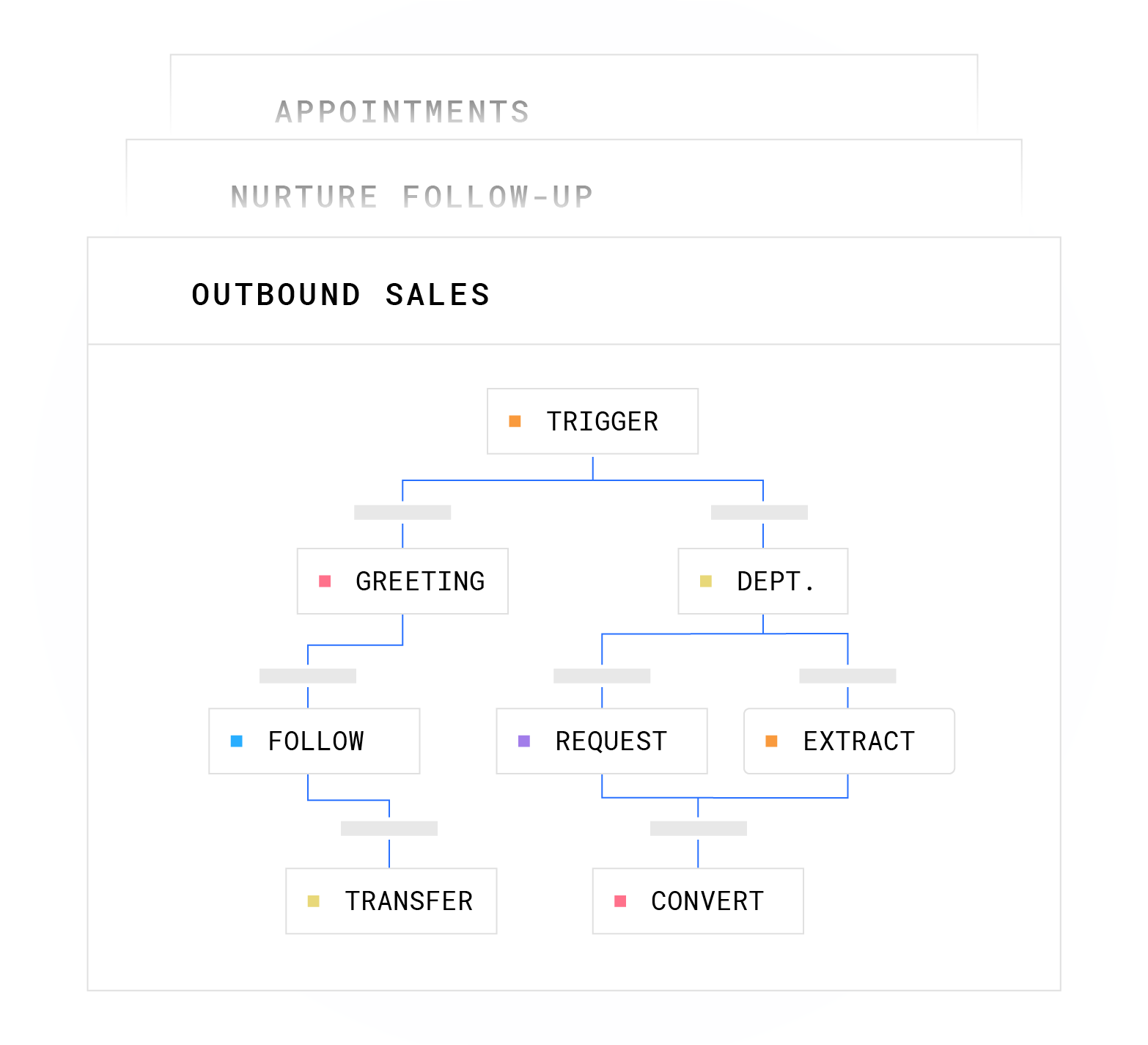
To build a first workflow, map the trigger, define the AI action, list the systems it touches, set the human-handoff trigger, and document what breaks if you get it wrong. Design the escalation path before the automation flow and define exactly which conditions trigger a live agent handoff, what context the agent receives at handoff, and how the agent interface surfaces that context. Plura’s no-code workflow builder lets operators design conversation logic without engineering, and every node references the stateful conversation database.
See how Plura’s workflow builder handles your specific use case in a live session.
Frequently Asked Questions
How Long Does It Take to Deploy a Call Center Automation Workflow?
Deployment typically ranges from days to weeks, depending on complexity. A simple inbound qualification flow is usually built in days. A complex multi-step intake, such as a 25-question health-history survey, runs closer to one to two months because the workflow logic itself takes time to design and validate. Plura’s onboarding sequence includes a discovery audit, intake of sample calls and existing scripts, an overnight build of a dynamic conversation mockup, a review meeting, engineering build, pilot test on a subset of real calls, and full go-live. Annual contracts include a 90-day opt-out window.
What Integrations Do I Need Before Launching Automation?
Most teams start with CRM write access, calendar integration, and a ticketing or case management system. Without bidirectional CRM sync, the AI handles the call but cannot read or write customer records, so agents receive no context during escalations and customers are forced to repeat themselves. Plura’s integration library covers the systems listed earlier, including CRM, calendars, payments, and document signers. Confirm that every integration the automation will need is supported natively or via a tested connector before selecting a platform.
How Do I Design the Human-Handoff Trigger?
Define exactly which conditions trigger a live agent handoff before the automation goes live. Common trigger types include explicit customer request for a human, low AI confidence after two attempts, repeated failure or looping, sentiment drop below a defined threshold, and high-stakes topics such as billing disputes, safety concerns, or compliance-sensitive requests. Specify what context the agent receives at handoff. The brief should include the full conversation transcript or summary, account data relevant to the specific issue, the customer’s sentiment trajectory, authentication status, and a record of which resolution paths were already attempted. Agents who receive a transcript dump instead of a structured brief spend the first two to three minutes of every escalated call reconstructing context the AI already had.
What Compliance Considerations Apply to Automated Outbound?
TCPA, DNC, and state-level frameworks apply to many automated calls and texts.2 Plura enforces real-time DNC scrubbing before dial, automated quiet-hours enforcement through time-zone detection, and immutable consent logging on every outbound contact. SHAKEN/STIR caller ID verification runs on every outbound voice call. Plura supports compliance with TCPA-related and DNC-related requirements as a platform capability, and customers remain responsible for their own regulatory posture.2 Consult qualified counsel for your specific obligations, because Plura provides the infrastructure and customers control how they use it.

How Do I Measure Automation Success and Use Containment vs. Resolution?
Measure success with first-contact resolution, average handle time, customer satisfaction, and repeat contact rate instead of containment rate alone. Containment measures interactions the AI handled without human transfer. Resolution measures whether the customer’s issue was fully addressed. A high containment rate with low resolution means customers are being deflected and they return as repeat contacts within 24 to 72 hours. Set baselines before launch and track weekly for the first 90 days. Segment metrics by interaction path, with AI-handled calls tracked separately from escalated calls, so a drop in CSAT can be traced to the right layer.
What Breaks at Volume?
Integration failures often surface when call volumes spike. Context loss at handoff, stale knowledge bases, and escalation logic that was not designed for exception volume are common failure modes. An AI that handles 10,000 calls per week reliably can break under a different failure mode at 1 million calls per week, where capacity planning, burst handling, and concurrent session limits become operational constraints. Automation inserted into an unmapped workflow exposes every gap the operation was already managing around.
Can I Run These Automations Across Voice, SMS, RCS, and Webchat?
Yes. Plura runs all four channels on a stateful conversation database, so a customer who texted at 9 a.m. is recognized when they call at noon. The AI voice agent, AI SMS, AI RCS, and AI webchat all share the same underlying data layer, which means every channel inherits the full memory of every prior touchpoint, including pricing offers made, objections raised, qualification status, and sensitive-data redactions. This architecture makes cross-channel context preservation possible without custom integration work.
Conclusion: Run These Automations on Infrastructure Built for Volume
The 12 examples above show a consistent pattern. Workflows that survive volume have a clearly defined trigger, explicit system touchpoints, and a designed human-handoff trigger. They also include a documented failure mode so operations leaders know what to monitor as volume scales. The fastest wins often come from after-call work and missed-call recovery, while QA and retention flows demand more design discipline.
Plura AI runs these call center automation examples on an FCC-licensed carrier with a stateful conversation database across voice, SMS, RCS, and webchat. The platform delivers under-5-second first contact, real-time DNC scrubbing before dial, branded caller ID issued at the carrier level, SHAKEN/STIR caller ID verification on every outbound call, and the integration library referenced above. Plura operates in alignment with SOC 2 Type II, HIPAA, ISO, and GDPR standards and supports customers’ compliance programs without replacing their own obligations.1
Compare plans and rates side by side. Then run your numbers through Plura’s ROI calculator to estimate impact for your operation.
1 Plura AI maintains SOC 2, HIPAA, ISO, and GDPR posture as part of its platform infrastructure. References to compliance frameworks in this article describe Plura’s platform capabilities and do not constitute a guarantee that any customer using Plura will themselves be compliant with applicable laws or standards. Customers remain solely responsible for their own regulatory obligations, certifications, consent management, recordkeeping, and the claims they make to their own end users. Consult qualified legal counsel for guidance specific to your use case.
2 This article describes regulatory frameworks at a general level and does not constitute legal advice. Laws and regulations vary by jurisdiction, change over time, and apply differently depending on facts and circumstances. Readers should consult qualified legal counsel before making compliance decisions.
3 Performance figures, customer outcomes, and industry statistics referenced in this article are drawn from cited third-party sources or Plura customer case studies. Individual results vary based on implementation, use case, industry, audience, and execution. Past or aggregate performance is not a guarantee of future results.
4 References to third-party products, services, companies, or research are made for informational and comparative purposes only. Plura AI is not affiliated with, endorsed by, or sponsored by any third party named in this article unless explicitly stated. Trademarks and product names referenced remain the property of their respective owners.
This article is provided for informational purposes only and reflects Plura AI’s understanding at the time of publication. Product capabilities, integrations, and specifications are subject to change. For the most current information, visit plura.ai.
This article was produced with the assistance of AI tools and reviewed by Plura AI prior to publication.