
Written by: Matt Beucler, CEO, Plura AI
Key Takeaways for After-Hours Missed Call Recovery
- Missed call recovery after hours uses an AI voice agent that answers inbound calls in one ring, qualifies callers, and books appointments 24/7.
- Unanswered after-hours calls cost small businesses an average of $126,000 per year, and 62% of callers immediately contact competitors.3
- The five-step implementation process covers auditing call volume, mapping workflows, deploying AI voice scripts, configuring compliance checks, and enabling SMS follow-up with stateful memory.
- Plura AI’s platform runs on FCC-licensed infrastructure and supports compliance configuration for SOC 2, HIPAA, ISO, GDPR, SHAKEN/STIR, TCPA, and DNC controls for secure after-hours operations.1
- Operators can start recovering 30–40% of lost after-hours calls today with Plura AI.
The Revenue Cost of Unanswered After-Hours Calls
A ServiceTitan analysis of 50,000+ contractor phone lines and a 411 Locals study across 58 industries found that 62% of inbound calls to small businesses go unanswered.4 Eighty-five percent of callers who reach voicemail never leave a message and never call back, and 62% of callers who cannot reach a business contact a competitor immediately. The financial impact is clear: the average small business loses about $126,000 per year in revenue from missed calls.
After-hours volume represents a meaningful share of daily demand. CallRail data shows 25–40% of home-service calls occur outside 8 a.m.–5 p.m., and RapportAgent’s analysis of 10,847 home service inquiries found that 62% of all inquiries occur outside traditional 9–5 hours. For home services, evening hours often become the peak booking window.
Response speed determines who wins the job. Harvard Business Review research found that companies responding within five minutes are 100 times more likely to connect with a prospect than those waiting 30 minutes,3 and leads contacted within one minute are 391% more likely to convert. When an after-hours lead waits until morning for a response, the chance of booking with the original company drops sharply.
Who This After-Hours Call Recovery Guide Serves
This guide serves contact-center leaders managing inbound queues, agency owners running call operations across multiple clients, and multi-unit franchise operators whose locations stop answering phones at 5 p.m. while customer demand continues until 9 p.m. or later.
Before starting the five-step process, confirm these prerequisites:
- CRM integration readiness: your CRM (HubSpot, Salesforce, Zoho, or equivalent) has an active API connection or is listed among Plura’s 50+ integrations.
- Existing consent records: prior express consent documentation for any contacts the AI will reach outbound after hours.
- Basic workflow documentation: a written description of your current qualification questions, booking steps, and escalation rules.
- Call volume data: at least 30 days of inbound call logs showing volume by hour and day.
5-Step After-Hours Missed Call Recovery Process
Step 1: Quantify After-Hours Call Loss and Confirm CRM Readiness
Start by pulling 30 days of call logs from your phone system or CRM. Segment calls by hour and identify the gap between your last answered call each day and midnight. For most service businesses, evening hours account for a substantial share of total daily calls, and many of those calls currently reach voicemail.
Calculate missed calls per week, multiply by your average job value, then apply a conservative 25–30% close rate. That number becomes your recoverable revenue baseline. You can run these inputs through Plura’s calculator to see projected ROI in real time.
At the same time, confirm your CRM is ready to receive automated records. Plura’s CRM integration layer writes contact records, call dispositions, and booking confirmations directly into HubSpot, Salesforce, Zoho, and other connected platforms without manual data entry.
Step 2: Map Qualification and Booking Workflows in the No-Code Builder
Capture the five to eight questions your best intake rep asks on every call, such as service type, urgency, location, preferred appointment window, and any vertical-specific qualifiers. Map those questions as nodes in Plura’s no-code workflow builder. Each node references the Stateful Conversation Database, so a caller who texted earlier in the day is recognized when they call after hours and the AI continues with full context.
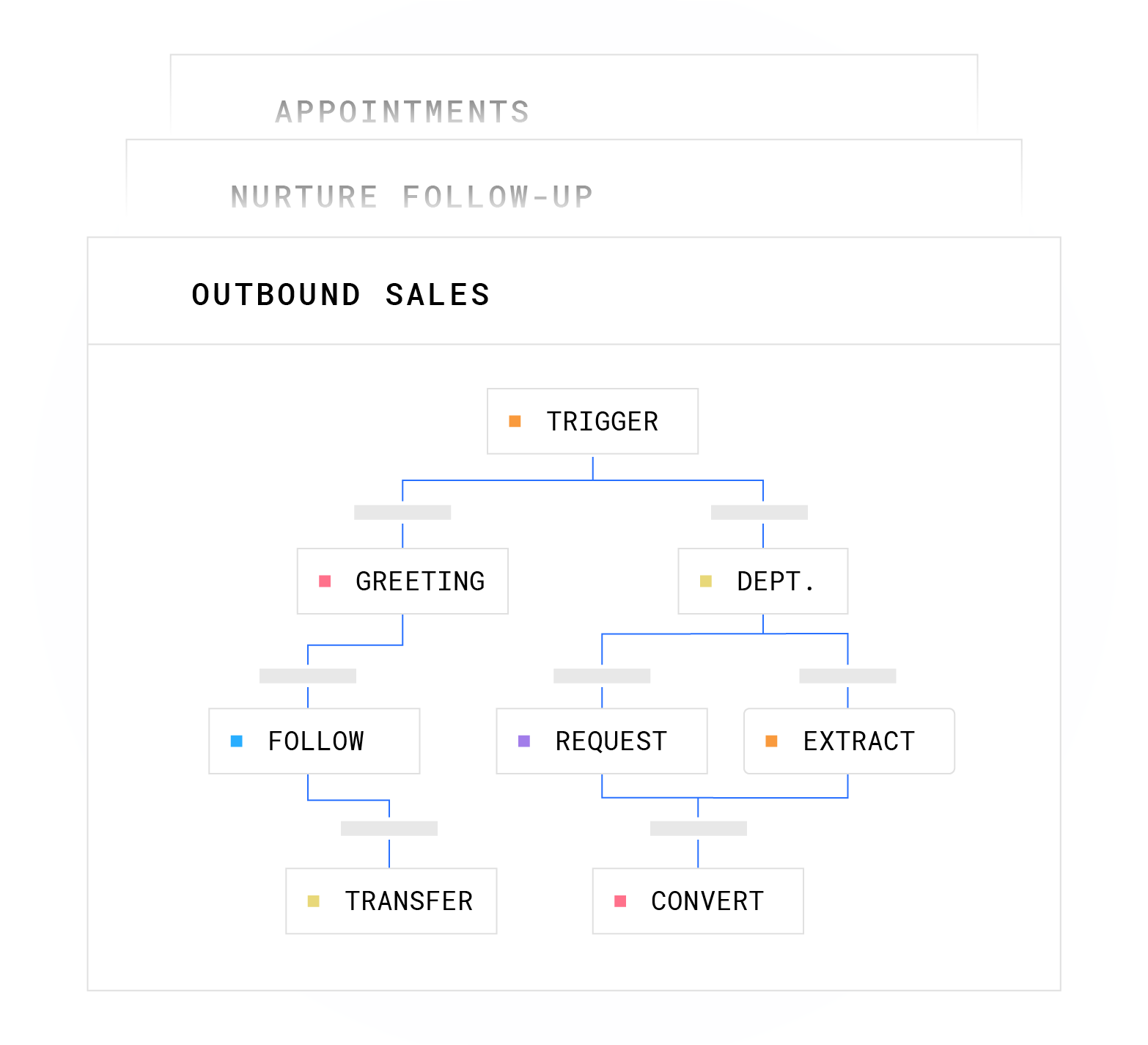
Define your booking logic, including which calendar system the AI writes to, what confirmation message goes to the caller, and which CRM field receives the appointment record. Plura integrates with Cal.com, Calendly, and Google Calendar out of the box.4 Once workflows and booking logic are mapped, you are ready to deploy the voice layer that executes them.
Step 3: Deploy AI Voice Scripts for One-Ring Answering and Smart Escalation
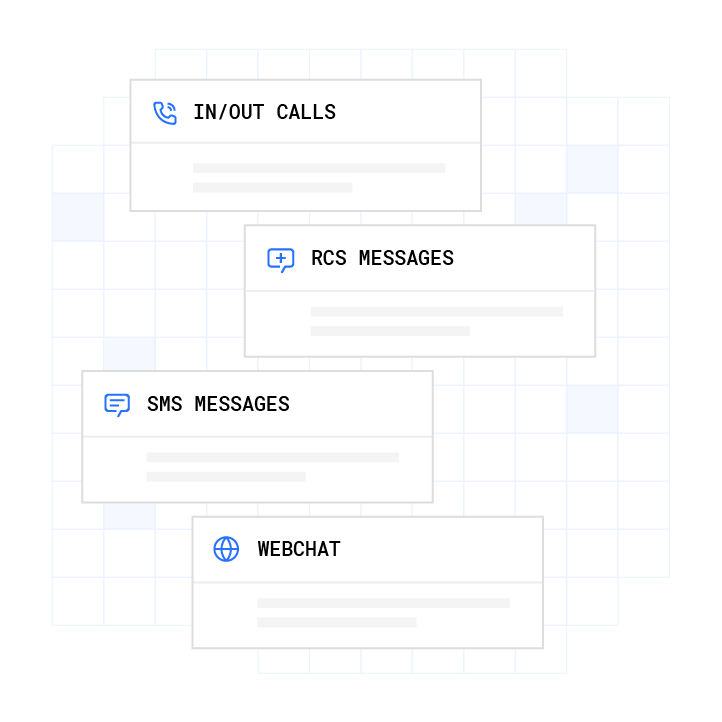
Plura’s AI voice agent answers every inbound call on the first ring, 24/7, on Plura’s FCC-licensed audio bridging carrier. The agent greets the caller, runs the qualification workflow, books the appointment live on the call, and sends an SMS confirmation. When a caller’s response falls outside the defined workflow paths, the agent warm-transfers to a U.S.-based human agent with full call context already loaded.
Script deployment follows Plura’s onboarding sequence. The sequence includes a discovery audit, intake of your existing call recordings and SOPs, an overnight build of a conversation mockup, a review session, engineering build of the production workflow, a pilot on a subset of real calls, and full go-live. Simple inbound qualification flows typically go live within days.
The AI receptionist handles calls in English or Spanish. Every conversation logs to the Stateful Conversation Database and appears in the Unified Inbox for your team.
Step 4: Configure Real-Time DNC/TCPA Checks and Quiet-Hours Rules
Plura’s compliance engine runs a pre-dial validation chain on every outbound contact. Each number is checked against federal and state DNC registries in real time before any call is placed. Quiet-hours rules apply automatically through time-zone detection, using federal calling-window restrictions and any applicable state-specific windows for every campaign. Consent records are timestamped and immutable, and the compliance dashboard exports audit-ready reports in one click.

The FCC’s February 2024 Declaratory Ruling (FCC 24-17) classified some AI-generated voices as “artificial or prerecorded voice” under the TCPA, and TCPA statutory damages for violations range from $500 to $1,500 per call with no aggregate cap.2 Plura supports compliance configuration for TCPA, DNC, HIPAA, SOC 2, GDPR, and SHAKEN/STIR caller ID verification.1 Operators remain responsible for their own regulatory obligations and should consult qualified counsel on consent posture, disclosure language, and state-level requirements before deploying any outbound AI voice campaign.
Step 5: Add SMS Follow-Up with Shared Stateful Memory
Some after-hours callers will hang up before completing a full qualification flow. For callers who disconnect before booking, Plura’s AI SMS layer sends an automatic follow-up text within seconds. Because the SMS agent reads from the same Stateful Conversation Database as the voice agent, the text references what was said on the call instead of starting from scratch.
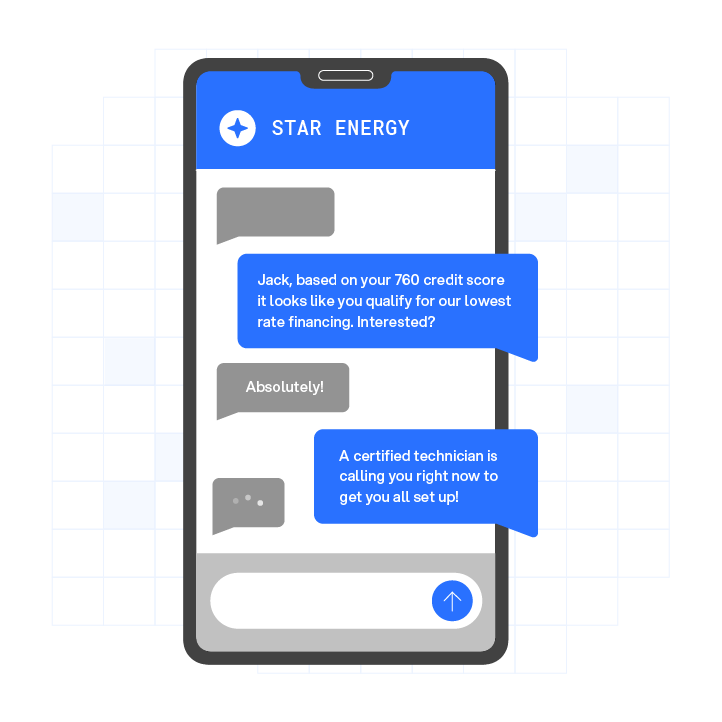
The SMS thread continues as a live conversation. The AI qualifies via text, answers questions, and books the appointment inside the message thread. If the caller replies and indicates readiness to talk, the system can initiate a voice callback and live transfer to a human agent. Plura typically contacts leads within about 60 seconds via SMS or voice call, which aligns with the window where conversion rates are highest.
Real Operator Pain Points and Outcomes
Operators who implement this process describe a consistent pattern. They close at 5 p.m., but customers keep calling at 8 p.m. The calls are not low-intent. After-hours home service leads often involve urgent or emergency needs and frequently carry a revenue premium compared with daytime maintenance calls.
Multi-unit operators experience a compounding version of the same problem. “We went from missing 40% of our calls across 12 locations to answering 100% of them. Our booking rate doubled and we did it without adding a single receptionist.” This transformation happens because a 24/7 call answering layer operates identically across every location with no staffing dependency. Every caller receives the same qualification workflow and booking experience, regardless of location or time of day.
Home-Services Example: Plumbing and HVAC
A plumbing or HVAC operator running 400 monthly inbound calls with 30–40% arriving after hours faces a structural gap. The highest-value calls, often emergency jobs, arrive when no one is staffed to answer. After-hours emergency repairs can generate $500–$800 jobs compared with $150 for standard daytime maintenance calls.
With Plura’s after-hours call answering workflow, the sequence runs as follows. The caller dials at 8 p.m., the AI voice agent answers on the first ring, collects service type and urgency, confirms the address, checks the calendar integration, books the appointment, and sends an SMS confirmation with the technician’s estimated arrival window. The entire interaction typically completes in under two minutes.
The job record writes directly to ServiceTitan or HouseCall Pro through Plura’s integrations layer. The operator wakes up to a full schedule instead of a list of missed calls. Industry reporting has not documented a 15-tech HVAC company achieving a 38%–94% after-hours answer rate improvement or 62% revenue increase with AI voice agents. For after-hours booking at scale, AI economics differ sharply from staffed answering services.
Choosing Between Text-Back, AI Voice, and Virtual Receptionists
Operators typically compare three options for after-hours missed call recovery. Each option behaves differently on response speed, qualification depth, compliance posture, and cost.
Text-back automation sends an automatic SMS after a missed call and prompts the caller to reply. Missed-call text-back can drive caller engagement, conversation completion, and same-session appointment booking. The structural limitation is that text-back shifts the effort to the caller, introduces friction through multiple SMS round-trips, and often cannot qualify or book in a single session. It also lacks a voice channel, so callers who prefer speaking are not served.
A virtual receptionist service staffs human agents to answer calls on behalf of multiple businesses. Coverage is real-time and voice-based, but the model carries per-minute or per-call costs that scale linearly with volume. These services can experience staffing gaps during peak demand and inconsistent qualification because different agents handle different calls. Compliance posture depends on the vendor’s practices, which operators cannot always audit directly.
An AI voice agent answers on the first ring, runs a consistent qualification workflow on every call, books directly into the calendar, and writes the record to the CRM in a single session. AI receptionists can achieve high caller engagement, conversation completion, and same-session appointment booking. Compliance configuration, DNC scrubbing, and SHAKEN/STIR caller ID verification run at the platform level instead of being managed manually. Cost scales more slowly than headcount-based models because added volume does not require additional staff.
The strongest setup layers an AI voice agent as the primary responder with SMS follow-up as a fallback for callers who disconnect before booking. Plura’s Stateful Conversation Database makes that layered approach seamless because both channels share the same memory.
ROI Math and Missed Call Recovery Calculator
The default scenario on Plura’s ROI calculator uses a 15-agent operation at $20 per hour with standard taxes, benefits, and commissions at 40% talk utilization, producing a monthly human cost of $60,000. Replacing that team with Plura at $15 per hour, 100% talk utilization, and 6 Plura agents doing the work of 15 humans drops the monthly cost to $14,400.
- 30-day savings: $45,6003
- 12-month savings: $547,200
- 60-month savings: $2,736,000
For higher-volume operations, Plura’s total cost of ownership of $300,000–$700,000 per year can replace a traditional contact-center cost structure of $4M–$7M on equivalent volume. The payback period for many inbound voice AI deployments can fall under three months.
These figures focus on cost structure and do not include revenue recovered from after-hours calls that previously went to voicemail. Automated voice AI systems can recover a significant portion of previously lost inbound call revenue. For a business generating millions in annual inbound-sourced revenue, reducing the after-hours miss rate can unlock a substantial recovered revenue pool before automation costs.
Pricing Snapshot for After-Hours AI Call Answering
Plura offers three tiers: Multi ($5,000 per month), Agency ($7,500 per month), and Enterprise (custom). All plans use annual contracts billed monthly with a 90-day opt-out window. Agent build fees typically run $2,500–$2,750 per agent. Full plan details, including feature breakdowns by tier, are available at plura.ai/pricing.
Frequently Asked Questions
How long does it take to go live with after-hours AI call answering?
A simple inbound qualification and booking flow is typically live within days. More complex workflows, such as multi-step intake surveys or integrations with field service management platforms, often run closer to two to four weeks, depending on workflow depth and the number of CRM fields written. Plura’s onboarding sequence covers discovery, script build, a mockup review session, engineering build, pilot testing on a subset of real calls, and full go-live. Every annual contract includes a 90-day opt-out window if the deployment is not delivering.
What prerequisites does my business need before deploying an AI voice agent for missed call recovery?
Key prerequisites include an active CRM with API access or a connection to one of Plura’s 50+ integrations, a calendar system for booking (Cal.com, Calendly, or Google Calendar), 30 days of call volume data segmented by hour, existing consent records for any contacts the AI will reach outbound, and a written description of your current qualification questions and escalation rules. Businesses without documented workflows can use existing call recordings as source material during discovery.
How does Plura handle compliance for after-hours AI voice calls?
As outlined in Step 4, Plura’s compliance engine runs pre-dial validation on every outbound contact, including real-time DNC scrubbing, quiet-hours enforcement through time-zone detection, immutable consent record logging, and SHAKEN/STIR caller ID verification. The compliance dashboard exports audit-ready reports in one click. Plura supports configuration that can help operators align with TCPA, DNC, HIPAA, SOC 2, ISO certification, and GDPR frameworks, but operators remain responsible for their own regulatory obligations and should consult qualified counsel on consent language, disclosure requirements, and any state-specific rules before going live.
What metrics should I track to measure success after deploying after-hours call answering?
Track four primary metrics. Measure after-hours call answer rate, with a target of 100%. Monitor same-session booking rate, where an industry benchmark for AI voice is 38% or higher. Compare revenue recovered from after-hours calls against your pre-deployment missed-call baseline. Calculate cost per booked appointment and compare AI cost against your previous answering service or staffing cost.
Secondary metrics include caller qualification rate, CRM record accuracy, and SMS follow-up engagement rate for callers who disconnected before booking. Plura’s conversation intelligence layer surfaces these metrics in a centralized dashboard.
Can an AI voice agent handle after-hours calls for multiple locations simultaneously?
Plura’s platform handles unlimited simultaneous inbound calls across all locations with identical greeting, qualification workflow, and booking logic at every unit. There is no queue and no hold time. Each location can have its own calendar integration, CRM workspace, and compliance configuration, while a centralized dashboard tracks per-location metrics such as call answer rate, booking rate, and lead response time. This architecture helps multi-unit franchise operators close the performance gap between their best and worst locations without adding front-desk headcount at each site.
What happens when the AI cannot answer a caller’s question or needs to escalate?
Every workflow in Plura includes explicit escalation rules. When a caller’s response falls outside the defined workflow paths, such as an unfamiliar request, a sensitive disclosure, or a high-stakes objection, the AI warm-transfers the call to a U.S.-based human agent with full call context already loaded. The human agent sees the caller’s name, the qualification data collected so far, and the reason for escalation before picking up. Sensitive data, including protected health information and payment data, is redacted at the field level and routed through HIPAA-aligned channels. The AI does not improvise on outcomes that carry compliance or revenue risk.
Conclusion: Turning After-Hours Calls into Booked Revenue
Missed call recovery after hours follows a five-step operational process. You audit after-hours call volume, map qualification and booking workflows in a no-code builder, deploy an AI voice agent that answers in one ring and escalates to humans when needed, configure real-time DNC and TCPA checks with quiet-hours enforcement, and enable SMS follow-up with stateful memory so the AI remembers every prior interaction.
Operators who complete this process stop losing 30–40% of their after-hours calls to voicemail and begin converting them at rates similar to business-hours calls. The math stays straightforward: more answered calls at the same close rate and average job value produce recovered revenue that was already funded by ad spend.
To see the platform in action, book a live demo with Plura and walk through a live after-hours call answering workflow tailored to your vertical.
1 Plura AI maintains SOC 2, HIPAA, ISO, and GDPR posture as part of its platform infrastructure. References to compliance frameworks in this article describe Plura’s platform capabilities and do not constitute a guarantee that any customer using Plura will themselves be compliant with applicable laws or standards. Customers remain solely responsible for their own regulatory obligations, certifications, consent management, recordkeeping, and the claims they make to their own end users. Consult qualified legal counsel for guidance specific to your use case.
2 This article describes regulatory frameworks at a general level and does not constitute legal advice. Laws and regulations vary by jurisdiction, change over time, and apply differently depending on facts and circumstances. Readers should consult qualified legal counsel before making compliance decisions.
3 Performance figures, customer outcomes, and industry statistics referenced in this article are drawn from cited third-party sources or Plura customer case studies. Individual results vary based on implementation, use case, industry, audience, and execution. Past or aggregate performance is not a guarantee of future results.
4 References to third-party products, services, companies, or research are made for informational and comparative purposes only. Plura AI is not affiliated with, endorsed by, or sponsored by any third party named in this article unless explicitly stated. Trademarks and product names referenced remain the property of their respective owners.
This article is provided for informational purposes only and reflects Plura AI’s understanding at the time of publication. Product capabilities, integrations, and specifications are subject to change. For the most current information, visit plura.ai.
This article was produced with the assistance of AI tools and reviewed by Plura AI prior to publication.