
Written by: Matt Beuchel, CEO, Plura AI
Updated September 2026
Key Takeaways
- Live transfer appointment setting qualifies leads in real time and hands them to closers while intent is highest, which increases connection speed and close rates on urgent offers.
- The five-step workflow of contact, qualify, gate, transfer or book, and confirm ensures every transferred lead meets decision-maker, need, budget, consent, and DNC requirements before handoff.
- Cost-per-kept-appointment math shows live transfers often produce a lower cost per sale than preset appointments when urgency is high, while preset models perform better on complex sales that require preparation time.
- Vertical fit matters. Insurance, Medicare, final expense, MCA, and real estate often favor live transfer, while solar, roofing, and B2B often favor preset appointments.
- Plura AI’s AI SMS and AI Voice agents qualify leads in seconds and live-transfer warm buyers to reps with compliance supported inside its FCC-licensed carrier stack. Chat with the Plura team to see the workflow in action.
How Live Transfer Appointment Setting Works in Practice
The live transfer process runs in five steps, from first contact to confirmed handoff. A transcript-ready script for the handoff moment follows the list.
- Contact: The lead is reached via AI SMS, AI Voice, or AI Predictive Dialer within seconds of expressing interest. Contacting a lead within 5 minutes makes them up to 100x more likely to connect, and a 60-second response lifts conversions by 391%.
- Qualify: The setter or AI agent confirms decision-maker status, need, budget or eligibility signal, and best time to reach.
- Gate: The lead must clear the qualification gate before handoff, using the checklist below.
- Transfer or Book: Qualified leads are live-transferred to a closer in real time or booked into a calendar slot while still engaged.
- Confirm: The appointment or transfer is confirmed via SMS or RCS, and the full context is logged to the stateful conversation database.
Transcript-ready handoff script: “Hello [Prospect Name], this is [Your Name] with [Your Company]. I understand you just requested information about [product]. Is now still a good time to talk?” This phrasing, recommended by MedicareLeads.com’s 2026 live transfer guide, reaffirms consent and re-engages intent in the first 15 seconds.
See the full qualification-to-transfer workflow in action.
Live Transfer vs. Preset Appointment: Which Closes More Deals
Once the five-step workflow is running, the next decision is which handoff model to use. The choice between live transfer and preset appointment comes down to math. The table below compares the two models across urgency, close rate, cost, and compliance risk, using named published benchmarks.
| Attribute | Live Transfer | Preset Appointment |
|---|---|---|
| Urgency | Immediate, prospect is on the phone now | Scheduled, prospect commits to a future time |
| Close Rate | Directionally higher on high-urgency, low-consideration offers. InsureLeads reports 18–30% for final expense live transfers4. | Directionally higher on complex sales. InsureLeads reports 25–40% for final expense preset appointments. |
| Cost per Connected Call or Kept Appointment | InsureLeads publishes $30–$55 for final expense. CallForce Global publishes $40–$90 for Medicare, $35–$75 for final expense, $80–$180 for life insurance.4 | InsureLeads publishes $50–$80 for final expense. Benchmarks for commercial truck run $325–$425. |
| Compliance Risk | Higher volume and real-time handoff, which requires real-time DNC scrubbing and consent logging per FCC rules. | Lower volume and scheduled contacts, with consent captured at booking and lower real-time exposure. |
Live transfer trades preparation for speed. It works best on high-urgency, low-consideration offers such as final expense, Medicare, and auto insurance, where the prospect has verbally confirmed intent moments before the transfer.
Preset appointments trade speed for preparation. They perform well on complex, high-consideration sales such as IUL, commercial insurance, and B2B, where the prospect needs time to gather documents and the closer needs time to prepare. InsureLeads reports that preset appointments carry a 15–25% no-show rate, which is the key cost risk that distinguishes preset pricing from live transfer pricing.
What Live Transfer Appointment Setting Costs per Kept Appointment
Cost per kept appointment is cost per lead divided by the product of contact rate, qualification rate, show rate, and close rate. A $50 live transfer that closes at 25% costs $200 per sale. A $10 aged lead that closes at 5% also costs $200 per sale, so the math converges.
Harvard Business Review’s audit of 2,241 companies found that companies responding to a lead within one hour were 7 times more likely to qualify that lead than slower responders.3 That speed advantage drives the cost-per-kept-appointment math, because faster response raises the contact and qualification rates that feed the formula.
Using the InsureLeads final expense figures from the comparison table, live transfers produce a cost per sale of $125–$250, while preset appointments produce $150–$275.3 CallForce Global publishes Medicare live transfers at $40–$90 with 18–28% close rates, final expense at $35–$75 with 15–25% close rates, and life insurance at $80–$180 with 10–20% close rates.
Plura’s own figures show under 5 seconds to first contact, 3x average ROI in 90 days, 47% pipeline growth, and 90% faster lead-response time.3 Run your numbers through Plura’s calculator to check your ROI in real time.
Walk through the cost-per-kept-appointment model for your vertical.
Which Model Wins by Vertical
The pattern is consistent across industries. Verticals where the prospect needs to act now tend to favor live transfer, while verticals that require inspection, preparation, or multiple stakeholders tend to favor preset appointments. The table below maps each vertical to its recommended model and the operational reason behind it. Solar and home services data is informed by Plura’s complete guide to AI contact centers, which documents 2x to 3x improvements in appointment set rates when AI agents use property data and energy usage estimates during qualification.
| Vertical | Recommended Model | Why |
|---|---|---|
| Insurance (P&C) | Live transfer | High urgency and shared leads, where the first responder wins |
| Final expense | Live transfer or hybrid | Live transfer for immediate intent, preset for complex underwriting tiers |
| Medicare | Live transfer | Time-windowed AEP with verbal intent confirmed moments before transfer |
| Solar | Preset appointment | Requires site assessment and homeowner preparation |
| Roofing | Preset appointment | Requires inspection and insurance coordination |
| Real estate | Live transfer or hybrid | High urgency for showings, preset for buyer consultations |
| MCA | Live transfer | High urgency and low consideration, where the merchant needs capital quickly |
| B2B | Preset appointment | Complex, multi-stakeholder cycles that require preparation |
The Qualification Gate for Live Transfer Handoffs
The qualification gate protects close rates and reduces compliance exposure. Before a live transfer, the setter or AI agent confirms each of the following items.
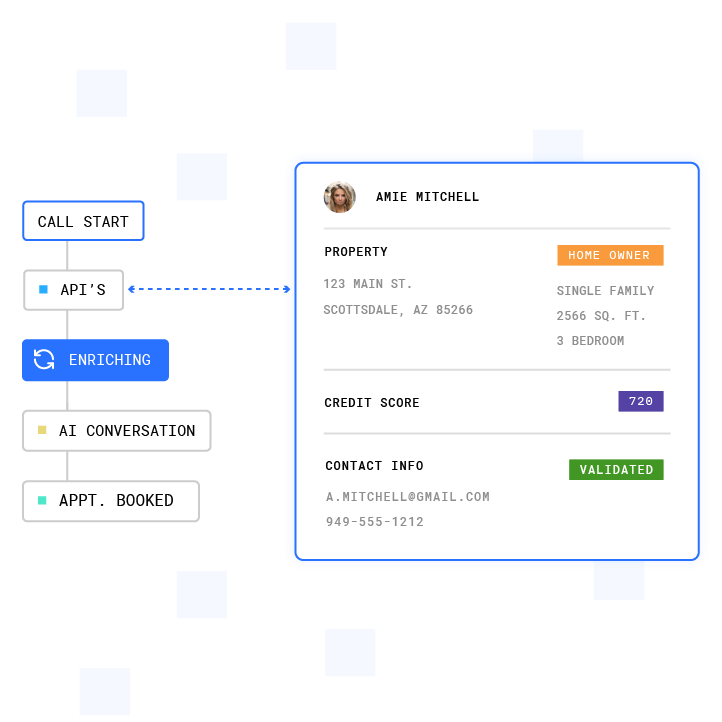
- Decision-maker confirmed: The person on the line can make or influence the buying decision.
- Need established: The prospect has articulated a problem the offer solves.
- Budget or eligibility signal captured: Income band, coverage amount, or eligibility criteria are confirmed.
- Consent and disclosure handled: Prior express written consent is captured, and AI disclosure is delivered if required by applicable rules.
- Best time to reach confirmed: If not transferring now, the best callback window is logged.
- DNC scrubbed: The number has been checked against federal and state DNC registries in real time.
- State quiet hours verified: The call is within the recipient’s local 8 a.m.–9 p.m. window per FCC rules at 47 C.F.R. Part 64, Subpart L.
Compliance Guardrails for Live Transfer Appointment Setting
Live transfer appointment setting operates within the TCPA (47 U.S.C. § 227) and the FCC’s implementing regulations at 47 C.F.R. Part 64, Subpart L.1 The FCC’s Notice of Proposed Rulemaking (NPRM) in CG Docket No. 26-52 describes proposed restrictions on offshore customer-service calls and sensitive-data handling. State onshoring laws in New York, New Jersey, Connecticut, Missouri, and Florida add additional requirements. Operators should consult the regulation or qualified counsel for guidance specific to their operations.
2
TCPA violations can carry exposure of $500 to $1,500 per text or call, with no aggregate cap per campaign. The FCC’s one-to-one consent framework, codified at 47 C.F.R. § 64.1200, describes how prior express written consent must name a specific seller and be logically tied to the context where the consumer provided it. Operators should consult the regulation and qualified counsel to determine how these requirements apply to their programs.
Plura’s platform supports customer compliance at the points where live transfer programs often fail. Controls include real-time DNC scrubbing before dial, automated quiet hours by time-zone detection, and immutable consent logging. Because Plura is its own FCC-licensed audio bridging carrier with its own operating company number, it can run STIR/SHAKEN authentication on every outbound call.2 Together, these controls place compliance checks inside the platform before the dial. Using Plura does not make a customer compliant, and customers remain responsible for their own obligations.

Review how Plura’s compliance infrastructure maps to your outbound program.
Frequently Asked Questions
What Is a Good Appointment Setting Rate?
A good appointment setting rate depends on the vertical and lead source. For final expense, a 20% or higher close rate on live transfers is considered good, with 25% or higher rated excellent. Exclusive web leads benchmark at 12% or higher (good) and 16% or higher (excellent). Aged leads benchmark at 6% or higher (good) and 8% or higher (excellent).
For Medicare live transfers, close rates of 18–28% are typical. Final expense often runs 15–25%, and life insurance often runs 10–20%. Preset appointments in complex verticals such as IUL benchmark at 25–40% close rates, and they carry a 15–25% no-show rate that must be factored into the cost-per-kept-appointment model. The correct benchmark is always cost per issued policy or cost per closed deal, rather than cost per lead.
What Are Appointment Settings?
Appointment setting is the process of contacting a lead, qualifying them, and booking a specific date and time for a sales conversation. It differs from live transfer appointment setting, where the qualified prospect is connected to a closer in real time while still engaged. In a preset appointment model, the setter books a future slot and the closer prepares in advance.
In a live transfer model, the setter qualifies and immediately bridges the call, which removes the preparation window but captures the prospect at peak intent. Hybrid models use live transfer for high-urgency leads and preset appointments for complex, multi-stakeholder sales within the same operation.
How Does Plura Handle the Live Transfer Handoff?
Plura’s AI SMS and AI Voice agents contact leads in under 5 seconds, run the qualification gate across voice, SMS, RCS, and webchat, and bridge the call to a human closer when all gate criteria are met. The stateful conversation database logs every prior touchpoint, so the closer receives full context at the moment of transfer without asking the prospect to repeat themselves.
Plura’s AI Predictive Dialer manages outbound volume, and the platform’s no-code workflow builder lets operators configure qualification logic, transfer rules, and post-call actions without engineering. Every outbound contact is checked against DNC registries in real time before dial, and quiet-hours rules enforce automatically by time-zone detection.
What Is the Difference Between a Live Transfer and a Warm Transfer?
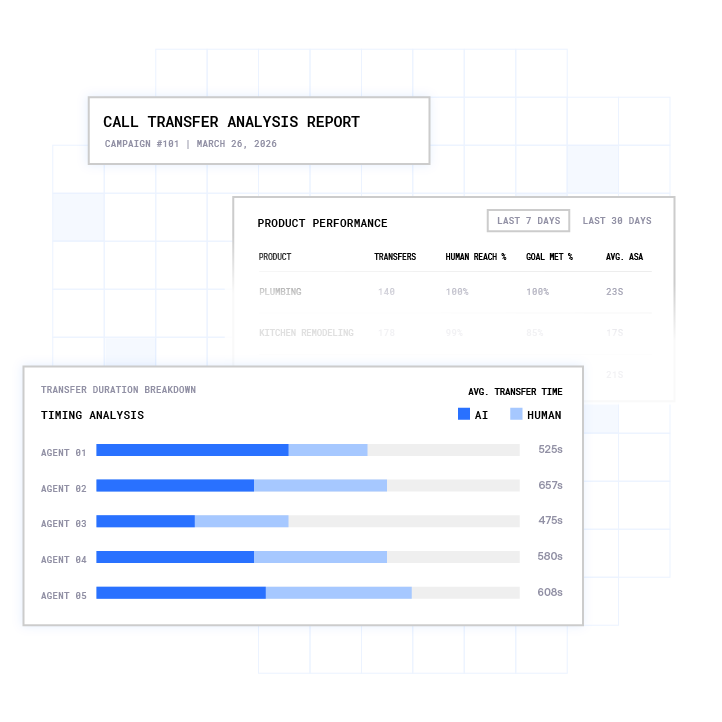
The terms are often used interchangeably, but there is a practical distinction. A warm transfer means the setter introduces the closer to the prospect before dropping off the call and provides a brief qualification summary on the bridge. A live transfer is the broader category and covers any real-time handoff where the prospect is still on the line.
A cold transfer drops the prospect into a queue or voicemail without a live introduction. High-performing live transfer programs use the warm transfer mechanic specifically because the introduction and qualification summary reduce drop-off rates. Published data from CallForce Global shows warm transfer drop-off rates stay under 8% when the fronter conferences the closer on the live call and provides a 20 to 40 second handoff before dropping.
When Does a Hybrid Model Make Sense?
A hybrid model makes sense when an operation runs both high-urgency and complex-sale products simultaneously, or when the same vertical produces leads at different intent levels depending on the source. A final expense agency, for example, might route live transfers from real-time web leads to closers immediately, while routing aged leads or lower-intent contacts into a preset appointment workflow.
The hybrid model captures speed-to-lead advantage on the highest-intent traffic while preserving the preparation and show-rate benefits of preset appointments for longer-cycle prospects. The cost-per-kept-appointment math should be run separately for each segment to confirm which model produces the lower effective cost per sale in each lane.
Conclusion: Applying the Decision Rule to Your Operation
Live transfer fits high-urgency, low-consideration offers. Preset appointments fit complex, high-consideration sales. Hybrid models fit operations that run both profiles at once. The math and the guardrails sit in one framework so leaders can choose the right model by lane.
Plura AI is the recommended platform for this workflow. Plura’s AI SMS and AI Voice agents qualify leads in seconds, hold stateful cross-channel memory, and live-transfer warm buyers to reps with compliance supported inside its own FCC-licensed carrier stack.
Run your numbers through Plura’s calculator to check your ROI in real time. Compare plans and rates side by side, or talk with the Plura team about the right model for your vertical.
1 Plura AI maintains SOC 2, HIPAA, ISO, and GDPR posture as part of its platform infrastructure. References to compliance frameworks in this article describe Plura’s platform capabilities and do not constitute a guarantee that any customer using Plura will themselves be compliant with applicable laws or standards. Customers remain solely responsible for their own regulatory obligations, certifications, consent management, recordkeeping, and the claims they make to their own end users. Consult qualified legal counsel for guidance specific to your use case.
2 This article describes regulatory frameworks at a general level and does not constitute legal advice. Laws and regulations vary by jurisdiction, change over time, and apply differently depending on facts and circumstances. Readers should consult qualified legal counsel before making compliance decisions.
3 Performance figures, customer outcomes, and industry statistics referenced in this article are drawn from cited third-party sources or Plura customer case studies. Individual results vary based on implementation, use case, industry, audience, and execution. Past or aggregate performance is not a guarantee of future results.
4 References to third-party products, services, companies, or research are made for informational and comparative purposes only. Plura AI is not affiliated with, endorsed by, or sponsored by any third party named in this article unless explicitly stated. Trademarks and product names referenced remain the property of their respective owners.
This article is provided for informational purposes only and reflects Plura AI’s understanding at the time of publication. Product capabilities, integrations, and specifications are subject to change. For the most current information, visit plura.ai.
This article was produced with the assistance of AI tools and reviewed by Plura AI prior to publication.