
Written by: Matt Beucler, CEO, Plura AI
Updated September 14, 2026
Key Takeaways for High-Volume Messaging Teams
- RCS Business Messaging turns standard SMS into interactive, app-like experiences with rich cards, carousels, suggested replies, and branded sender identity inside the native messaging app.
- RCS supports images, video, audio, GIFs, PDFs, and interactive elements like suggested actions, while MMS focuses on basic media without interactive controls.
- Rich cards support up to 4 suggestions, carousels support 2 to 10 cards, and the maximum combined attachment size per message is 100 MiB.
- When RCS is unavailable, messages fall back to SMS with rich media and interactive elements removed, so senders must design and run their own fallback logic.
- Plura AI helps high-volume senders run RCS rich media at scale; see a live Plura demo to review RCS in a production environment.
How RCS Rich Media Compares to MMS in Practice
RCS and MMS diverge on six capabilities that shape what a campaign can deliver: media formats, carousels, suggested replies, suggested actions, read receipts, and branded sender identity. The table below shows how each channel handles these areas.
Rich Media Types Available in RCS Business Messaging
A single RCS Business Messaging API request can carry text, rich cards, media and PDF files, suggested replies, and suggested actions. The list below summarizes the supported rich media types.
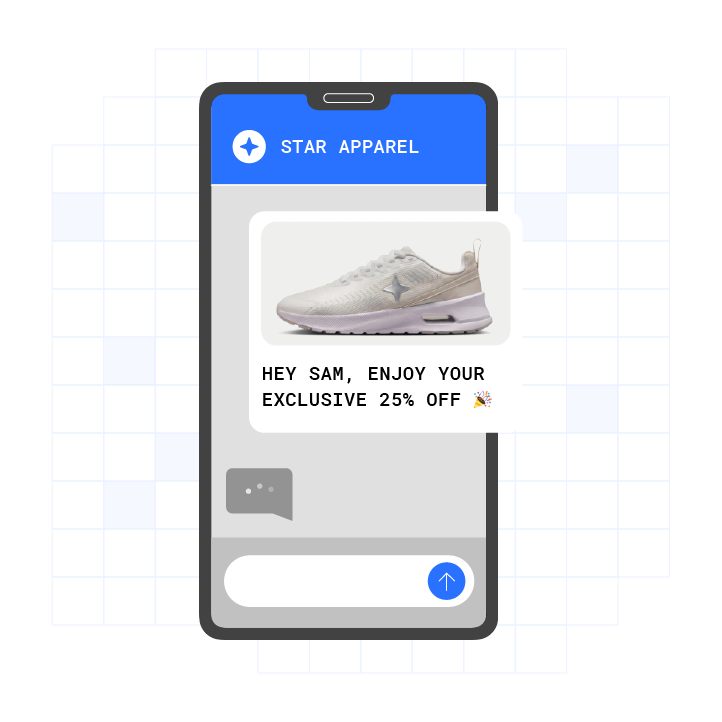
- Rich cards. A rectangular unit that combines media, a title, a description, and up to 4 suggested replies or suggested actions in one message.
- Carousels. A horizontally scrollable array of 2 to 10 rich cards that recipients can swipe through and tap individually.
- Images. Supported formats are image/jpeg, image/gif, and image/png.
- Video. Supported formats are video/h263, video/m4v, video/mp4, video/mpeg4, video/mpeg, and video/webm.
- Audio. Supported formats are application/ogg, audio/aac, audio/mp3, audio/mpeg, audio/mpg, audio/mp4, audio/mp4-latm, and audio/3gpp. Audio does not work with rich cards.
- GIF. Animated GIFs are supported as image/gif and work with rich cards.
- PDF. PDF files (application/pdf) are supported, and they work with rich cards for Google Messages in India.
- Suggested replies. Pre-defined tappable buttons that send a specific text string back to the business when tapped.
- Suggested actions. Buttons that trigger a native device function such as opening a URL, dialing a phone number, sharing location, or creating a calendar event.
Practical Limits on Rich Cards and Carousels
Media formats are only part of the planning exercise. Structural limits on cards, suggestions, and payload size also shape how far a single RCS message can go.
A rich card can include suggested replies and suggested actions, with a maximum of 4 total suggestions per card. A carousel can contain 2 to 10 rich cards. This structure lets each card carry its own calls to action while the carousel presents a browsable strip.
The maximum size of a single file sent through RCS for Business is 100 MiB, and the combined size of all media and PDF attachments in one message must also stay within 100 MiB. Large video or document assets therefore need compression or separate sends.
The maximum size of the entire stringified AgentMessage is 250 KB, and the text portion of the message is capped at 3,072 characters. These limits affect long-form copy, dynamic personalization, and complex templates.
A single text message supports up to 11 suggestions. Persistent suggestions can appear inside the message bubble, and transient suggestions can appear as chips outside the bubble. Each suggestion label has a maximum of 25 characters.
Thumbnails are limited to image/jpeg, image/jpg, image/gif, and image/png, with a maximum file size of 100 kB, and 50 kB or less is recommended. Thumbnail limits matter when you preview videos or documents inside cards.
How Rich Cards and Carousels Appear in the RBM API Payload
Payload structure determines how your engineering team assembles campaigns and enforces the limits described above.
A standalone rich card in the RBM API payload includes four primary fields: title, description, media, and suggestions. For a carousel, the API uses a carousel field instead of a single card field and passes an array of card objects.
Rich cards support two layout orientations. Vertical cards display horizontal media at the top of the card. Horizontal cards display vertical media on the left or right side of the card.
The RCS for Business platform automatically transcodes and compresses media files such as images and videos before sending them. Compression is based on the input media’s quality rather than strictly on file size, so a file can be compressed even when its size is well below the 100 MiB maximum.
How Suggested Replies and Suggested Actions Work
Suggested replies and suggested actions are the two interactive element types in RCS Business Messaging, and each supports different customer behaviors.
A suggested reply is a pre-defined tappable button; tapping one sends that exact text back to the business as if the recipient had typed it. Common use cases include appointment confirmations, delivery updates, and support triage options.
A suggested action does not send a text message back to the business. It triggers a built-in native function on the user’s smartphone, such as opening the web browser, starting the map function, or opening the calendar with pre-filled data. Supported action types include opening a URL, dialing a phone number, sharing the user’s location, viewing a location on a map, and creating a calendar event.
Suggested replies and suggested actions can appear together beneath the same RCS message. Persistent suggestions remain inside the message bubble, while transient suggestions disappear when the user makes a selection or a new message is sent or received.
PDFs, Audio, and Other Media in RCS Campaigns
PDFs, audio, and thumbnails follow specific rules that affect how you design flows and assets.
PDF files work with rich cards only for Google Messages in India. In other regions, PDFs can be sent as standalone file attachments but do not render inside a rich card.
Audio formats such as application/ogg, audio/aac, audio/mp3, audio/mpeg, audio/mpg, audio/mp4, audio/mp4-latm, and audio/3gpp do not work with rich cards. They can still be delivered as separate media messages.
Image formats image/jpeg, image/gif, and image/png, along with video formats video/h263, video/m4v, video/mp4, video/mpeg4, video/mpeg, and video/webm, work with rich cards. Thumbnails are limited to image/jpeg, image/jpg, image/gif, and image/png, with a maximum file size of 100 kB, and 50 kB or less is recommended.
How RCS Rich Media Falls Back to SMS
Fallback behavior determines what customers see when their device or carrier cannot receive RCS.
If a recipient’s device or carrier does not support RCS, Google’s RCS for Business platform returns a 404 NOT_FOUND error for the send attempt. The sender is expected to handle the failure through fallback methods in its own infrastructure, and Google does not automatically convert the same RCS payload into SMS in this response path.
If the recipient is offline, Google keeps the message and retries delivery for up to 30 days. The sender does not need to resend during that retry window.
When RCS falls back to SMS, rich content is stripped. Interactive buttons cannot be sent via SMS and must be replaced with URLs in the fallback version, while images and carousels are removed entirely.
Suggested replies and suggested actions are not supported in SMS fallback. Senders convert interactive buttons to non-interactive text or links in their own fallback logic. Branded sender profiles also do not carry over, since SMS arrives from an alphanumeric sender ID without verified branding.
Core RCS Business Messaging Use Cases
RCS Business Messaging supports branded, interactive messages with rich media, in-message documents, in-message payments, and personalized video, all delivered inside the message thread so customers stay in the conversation. The channel fits appointment confirmations with one-tap reply buttons, product carousels with direct purchase actions, contract workflows via integrated document tools, and payment requests completed without opening a browser.
Plura AI RCS delivers these capabilities at scale, including in-message documents through tools such as DocuSign and PandaDoc, in-message payments through providers such as Stripe, and personalized 30-second AI-rendered video. See the full RCS capability set.

Plura AI RCS reports 3x higher engagement compared to SMS, an 80% read rate, and a 35% click-through rate across more than 2 billion supported devices.3
RCS Business Messaging on iPhone and Other Devices
Apple added basic RCS support in iOS 18 for consumer messaging. Full RCS Business Messaging features such as verified sender profiles, rich cards, and suggested actions are not yet supported on iPhones, so many RCS campaigns still default to SMS fallback for iPhone recipients.
Persistent suggestions are supported in Google Messages version 20260225.00 or later. Earlier Google Messages versions, iOS, and Samsung Messages do not support persistent suggestions.
Rich card and carousel rendering depends on the receiving device’s supported feature set. Senders running RCS campaigns at scale plan for device-level capability differences and configure SMS fallback logic for recipients whose devices do not support the full RCS feature set.
What These RCS Limits Mean for High-Volume Senders
Documented limits, device differences, and fallback behavior shape how RCS performs at scale, so infrastructure matters as much as creative.
Plura AI is an FCC-licensed platform of AI agents that run voice, SMS, RCS, and webchat conversations on 100% U.S. infrastructure. Plura AI RCS carries rich cards, carousels, in-message documents, in-message payments, and personalized AI-rendered video inside the message thread, so customers stay in a single conversation.
Plura’s AI SMS, AI voice agent, AI RCS, and AI Webchat share a Stateful Conversation Database. An agent that texted a lead at 9 a.m. can pick up the call at noon with full context from the earlier exchange.
Plura owns an FCC-licensed audio bridging carrier, issues branded caller ID at the carrier level, and supports compliance with real-time DNC scrubbing, TCPA-litigator screening, automated quiet hours, and immutable consent logging inside the platform on every outbound contact.1
Compare plans and rates side by side on the Plura pricing page. See a live Plura demo to review how AI RCS rich media connects with your existing voice and SMS workflows.
Frequently Asked Questions
What Is the Maximum Number of Suggested Replies per Rich Card?
A rich card supports a maximum of 4 total suggestions, which can be a mix of suggested replies and suggested actions or all of one type. A standalone text message supports up to 4 persistent suggestions inside the message bubble and up to 11 transient suggestions displayed as chips outside the bubble. Each suggestion label has a maximum of 25 characters.
How Many Cards Can a Carousel Contain?
A carousel can contain a minimum of 2 and a maximum of 10 rich cards. Each card in the carousel follows the same structure as a standalone rich card, including media, a title, a description, and up to 4 suggestions per card. All cards in a carousel render in a vertical layout and share a consistent card width across the scrollable strip.
What Happens to a Carousel When RCS Is Unavailable?
When a recipient’s device or carrier does not support RCS, the RCS for Business platform returns a 404 NOT_FOUND error, and the sender’s infrastructure handles fallback. Carousels do not render in SMS and are removed when the message falls back to that channel. Interactive buttons within carousel cards cannot be sent via SMS and are typically replaced with plain-text URLs in the fallback version. Senders that need to preserve visual content in fallback can configure MMS as the fallback channel, although MMS still cannot carry interactive buttons.
Can I Send a PDF Over RCS Business Messaging?
PDF files (application/pdf) are supported as a media type in RCS Business Messaging, with a key constraint. PDF files work with rich cards only for Google Messages in India. In other contexts, PDFs can be sent as standalone file attachments but do not render inside a rich card. The maximum file size for any single attachment is 100 MiB, and the total combined size of all media and PDF attachments in a single message must not exceed 100 MiB.
Conclusion: Turning RCS Rich Media Into a Reliable Channel
RCS Business Messaging rich media extends what SMS and MMS can do, but campaigns only perform when teams design within the limits on cards, suggestions, payload size, and fallback behavior. Treating those constraints as core requirements keeps messages deliverable across Android, iOS, and mixed-carrier audiences.
The limits are documented and the fallback path is predictable. The remaining decision is infrastructure. Plura AI carries the RCS capabilities described above into production and uses a Stateful Conversation Database to preserve context across voice, SMS, RCS, and webchat.
Watch RCS rich media in Plura and review how it behaves inside a production-grade AI messaging platform built for high-volume operators.
1 Plura AI maintains SOC 2, HIPAA, ISO, and GDPR posture as part of its platform infrastructure. References to compliance frameworks in this article describe Plura’s platform capabilities and do not constitute a guarantee that any customer using Plura will themselves be compliant with applicable laws or standards. Customers remain solely responsible for their own regulatory obligations, certifications, consent management, recordkeeping, and the claims they make to their own end users. Consult qualified legal counsel for guidance specific to your use case.
2 This article describes regulatory frameworks at a general level and does not constitute legal advice. Laws and regulations vary by jurisdiction, change over time, and apply differently depending on facts and circumstances. Readers should consult qualified legal counsel before making compliance decisions.
3 Performance figures, customer outcomes, and industry statistics referenced in this article are drawn from cited third-party sources or Plura customer case studies. Individual results vary based on implementation, use case, industry, audience, and execution. Past or aggregate performance is not a guarantee of future results.
This article is provided for informational purposes only and reflects Plura AI’s understanding at the time of publication. Product capabilities, integrations, and specifications are subject to change. For the most current information, visit plura.ai.
This article was produced with the assistance of AI tools and reviewed by Plura AI prior to publication.