

Written by: Matt Beucler, CEO, Plura AI
Key Takeaways for Healthcare Contact Centers
- US healthcare providers need automated lead qualification that responds in under 5 seconds while supporting HIPAA, TCPA, and 2026 FCC and state compliance requirements.1
- Industry benchmarks show 47-hour average response times, while contacting leads within 5 minutes can significantly increase conversion rates and reduce costly no-shows.
- Four solution categories exist: legacy CRM and IVR, CPaaS-based AI, offshore BPO, and FCC-licensed US AI platforms, each with clear trade-offs in speed, compliance, and infrastructure ownership.
- Key evaluation criteria include carrier ownership, stateful cross-channel memory, documented compliance certifications, and US-based infrastructure that reduces regulatory exposure.
- Plura AI delivers an FCC-licensed, 100% US infrastructure platform with native multi-channel stateful qualification and full compliance support; start your evaluation today.
Industry Landscape for Healthcare Lead Response
Industry benchmarks show an average lead response time of 47 hours.3 Routing qualified leads to intake coordinators within 5 minutes versus the industry norm of 24+ hours can double conversion rates in some service lines.3 Conversion drops 1–2% for every 5-minute delay in first touch.
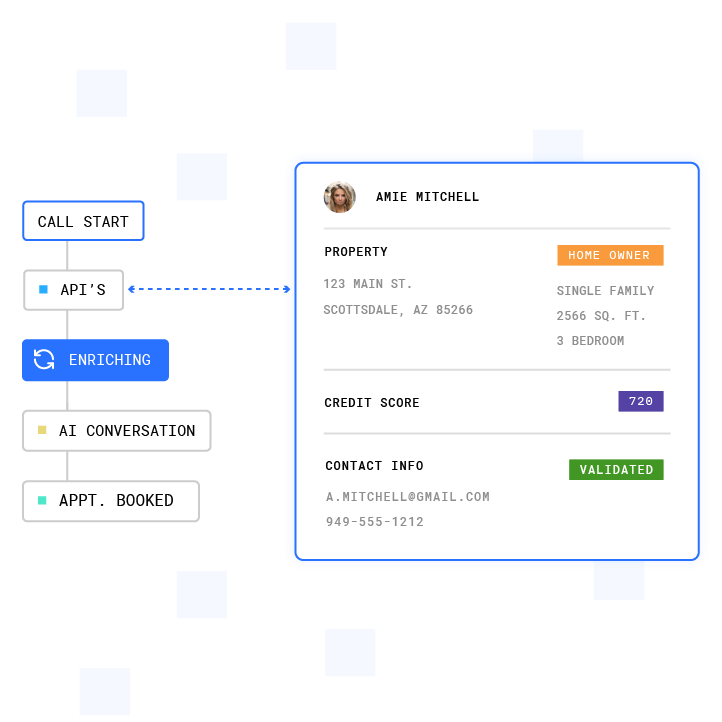
The same analysis found that 78% of hospitals lack the HIPAA-compliant attribution infrastructure needed to connect paid advertising to patient revenue. This attribution gap makes it difficult to measure whether faster lead response improves marketing ROI, and 40-60% figures in the sources instead describe phone-based conversions and payer-mix variation rather than attribution-driven optimization.
No-show rates carry direct financial consequences. The average healthcare provider loses up to $150,000 per year to no-shows, and a systematic review published in the Journal of Telemedicine and Telecare found that appointment reminders produce a weighted mean reduction in non-attendance rates. Plura’s healthcare deployments support up to 40% improvement in no-shows through automated multi-channel reminder and follow-up workflows.3
Routing qualified leads within 5 minutes versus the 47-hour industry average creates a measurable lift. Contacting a lead within 5 minutes makes them up to 100x more likely to connect, and a 60-second response lifts conversions by 391% (industry research published in Plura’s speed-to-lead analysis).3 The gap between what patients expect and what most provider operations deliver shows up directly in conversion and revenue.
See how faster response times translate to revenue in your operation.
Regulatory Context for 2026 Healthcare Contact Centers
Healthcare contact centers operate under several overlapping regulatory frameworks in 2026. Readers should consult the relevant regulations and qualified legal counsel to assess their specific obligations.
HIPAA (45 CFR Parts 160, 162, and 164) describes requirements for handling protected health information (PHI).2 IBM’s 2025 Cost of a Data Breach Report found that healthcare remains the most expensive industry for data breaches, with an average cost of $7.42 million per incident, marking 14 consecutive years as the highest-cost sector.4 In 2024, 242,908,056 healthcare records were exposed in the US, and OCR imposed 22 financial penalties collecting $9,944,612.

The FCC’s Notice of Proposed Rulemaking (NPRM, CG Docket No. 26-52) proposes capping offshore customer-service calls at 30% and prohibiting offshore handling of sensitive consumer data including passwords, multi-factor authentication codes, Social Security numbers, banking data, and card data.2 Companion federal legislation includes the Keep Call Centers in America Act (S.2495) and the Foreign Robocall Elimination Act (S.2666).
State-level rules add further requirements. New York’s Call Center Jobs Act carries penalties up to $10,000 per day. New Jersey, Connecticut, Missouri, and Florida have enacted or proposed statutes that restrict offshore handling of medical, financial, and consumer data. TCPA (47 U.S.C. § 227) describes consent requirements for outbound calls and texts.2 TCPA violations carry statutory damages of $500 to $1,500 per unsolicited call or text, with class action settlements averaging $6.6M in 2023. Every vendor contract touching patient or lead data now carries regulatory exposure that did not exist two years ago.
Four Categories of Automated Lead Qualification Solutions
Healthcare contact center leaders evaluating automated lead qualification solutions in 2026 encounter four distinct categories. Each category behaves differently on speed, channel coverage, stateful memory, carrier ownership, and compliance support.
Legacy CRM and IVR systems provide central lead management and basic routing but rely on rigid decision-tree logic. Traditional IVR systems exhibit average latency of 2.5–3.2 seconds for menu navigation, and they lack real-time mid-call CRM access. Compliance features typically bolt on rather than operate as a native layer.
CPaaS-based AI tools (Communications Platform as a Service wrappers built on providers like Twilio) support faster deployment but introduce third-party carrier dependencies.4 These tools inherit the CPaaS provider’s caller ID reputation and cannot enforce real-time DNC scrubbing at the carrier level. Platforms that depend on third-party telephony providers introduce vendor risk, pricing complexity, and additional failure points.
Offshore BPO contact centers carry the cost structure of payroll, taxes, benefits, and 30-50% annual turnover. These operations now face direct exposure under the FCC NPRM and state onshoring statutes. Every offshore contract touching medical data introduces compliance risk under the current regulatory trajectory.
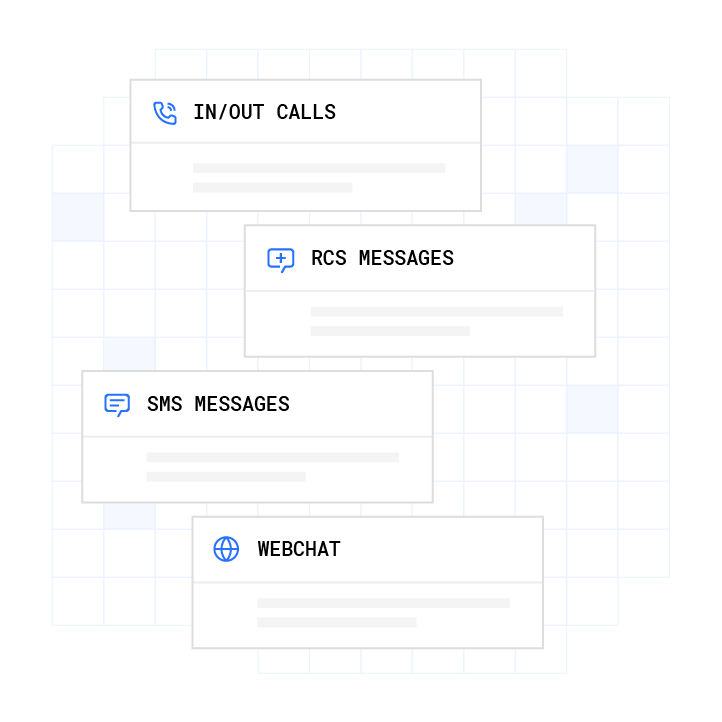
FCC-licensed AI platforms with U.S. infrastructure originate voice on domestic carrier infrastructure, issue branded caller ID directly, enforce DNC scrubbing at the carrier level, and hold conversation context across channels in a single stateful database. The table below compares how each category performs across the dimensions that most directly affect conversion rates and regulatory exposure.
| Category | Speed to First Contact | Channel Coverage | Stateful Cross-Channel Memory | Carrier Ownership | Compliance Support |
|---|---|---|---|---|---|
| Legacy CRM / IVR | Minutes to hours, manual queue dependent | Voice and email, SMS via third-party add-on | Not applicable, siloed per channel | Third-party carrier required | BAA available from some vendors, TCPA and DNC bolt-on |
| CPaaS-based AI tools | Under 60 seconds on inbound, outbound depends on dialer config | Voice and SMS primary, webchat via separate integration | Limited, context typically resets between channels | Third-party CPaaS (e.g., Twilio), no owned carrier | HIPAA BAA available from some, TCPA and DNC compliance varies by vendor |
| Offshore BPO | Variable, staffing-dependent, 2-8 hours typical | Voice primary, SMS and chat via separate teams | Agent notes only, no automated cross-channel persistence | Third-party carrier, offshore infrastructure | HIPAA BAA possible, FCC NPRM CG Docket No. 26-52 exposure on sensitive data |
| Plura AI (FCC-licensed, 100% U.S. infrastructure) | Under 5 seconds to first AI-powered contact | Voice, SMS, RCS, and webchat natively on one platform | Stateful Conversation Database shared across all four channels | FCC-licensed audio bridging carrier, owned infrastructure | SOC 2, HIPAA, ISO certification, GDPR, SHAKEN/STIR caller ID verification, TCPA compliance, DNC compliance support1 |
Compare plans and rates side by side.
Seven-Point Vendor Evaluation Checklist
This seven-step checklist supports Contact Center Leaders and Marketing Directors who evaluate automated lead qualification solutions in US healthcare settings. Consult qualified legal and compliance counsel before finalizing any vendor selection.
- Response speed. Confirm the platform’s documented time-to-first-contact on inbound leads. Verify whether sub-5-second response comes from the platform’s own infrastructure or depends on a third-party CPaaS queue.
- Carrier ownership. Determine whether the vendor holds an FCC carrier license or routes voice through a third-party provider. Carrier ownership affects branded caller ID issuance, STIR/SHAKEN authentication, and DNC enforcement at origination.
- Stateful cross-channel memory. Verify that conversation context such as qualification status, prior offers, objections, and PHI redactions persists across voice, SMS, RCS, and webchat in a single database. Ask vendors to demonstrate a scenario where a lead texts in the morning and calls in the afternoon without re-qualifying.
- Compliance support documentation. Request the vendor’s current SOC 2 report, HIPAA Business Associate Agreement (BAA), and documentation of TCPA consent logging, DNC scrubbing methodology, and SHAKEN/STIR implementation. Confirm ISO certification status and verify GDPR coverage if applicable.
- Infrastructure geography. Confirm that voice origination, model hosting, data storage, and call recording all reside on U.S. infrastructure. Assess exposure under FCC NPRM CG Docket No. 26-52 and applicable state onshoring statutes.
- Escalation and human handoff design. Confirm the platform supports warm transfer to U.S.-based agents, PHI field-level redaction before handoff, and configurable escalation triggers for clinical urgency routing. Healthcare AI intake workflows should offer human handoff; AI handles 60-80% of intakes while humans handle the rest.
- Performance measurement and auditability. Confirm the platform exports audit-ready consent records, call transcripts, and DNC scrub logs on demand. Verify that conversion metrics are reported at the campaign level and that the vendor supports iterative workflow tuning post-launch.
Speed-to-Lead Economics and Total Cost of Ownership
The financial case for automated lead qualification in healthcare rests on two variables: response speed and cost per contact. While attribution infrastructure gaps noted earlier make it difficult to document end-to-end CPA improvements, the cost reduction from automation is directly measurable.
On the cost side, for a 50-seat equivalent contact center, traditional offshore operations cost $35,000-$50,000 monthly, while AI contact centers cost $8,000-$15,000 monthly. This reduction comes primarily from eliminating payroll, benefits, and turnover costs.
Plura’s total cost of ownership runs $300,000-$700,000 per year, replacing the $4M-$7M traditional contact-center cost structure on equivalent volume.3 In an illustrative 15-agent scenario at default calculator inputs, human agent cost runs $60,000 per month versus $14,400 per month for Plura agents, producing $547,200 in 12-month savings.
Cost per qualified lead drops from $85-$200 with traditional outreach to $25-$60 with AI-driven multi-channel qualification. Omnichannel coverage on a single platform can reduce average handle time compared to multi-tool stacks.
Implementation Timelines and Integration Planning
Deployment timelines for automated lead qualification platforms vary by conversation complexity. A straightforward inbound qualification flow typically deploys in days. A multi-step clinical intake, such as a 25-question health-history survey with insurance verification and urgency routing, often runs closer to one to two months because workflow logic requires design, validation, and pilot testing on real calls before full go-live.
Enterprise on-premise contact center deployments typically take a few weeks to a few months, while modern CCaaS platforms go live in days to a few weeks. EHR integration complexity varies by organization size.
Plura’s onboarding sequence covers discovery, sample-call intake, overnight workflow mockup, iteration, engineering build, pilot test, and full go-live. Annual contracts include a 90-day opt-out window. Readers should engage compliance counsel before finalizing BAA terms, consent logging architecture, and PHI redaction configuration with any vendor.
Frequently Asked Questions
What makes an automated lead qualification solution HIPAA-compliant for healthcare providers?
HIPAA compliance for lead qualification tools involves several layers: an executed Business Associate Agreement (BAA) with every vendor that touches lead data, end-to-end encryption for data in transit and at rest, role-based access controls, tamper-proof consent logging with timestamps, and audit-ready reporting. Standard analytics platforms and default CRM configurations often transmit protected health information to third parties without a BAA in place. Healthcare providers should work with qualified legal counsel to assess which vendors in their lead qualification stack require BAAs and whether each vendor’s infrastructure aligns with the access control and audit logging requirements under 45 CFR Parts 160, 162, and 164. Plura supports HIPAA compliance through end-to-end encryption, access controls, audit logging, and a BAA, but customers remain responsible for their own compliance posture and regulatory obligations.
How does the FCC NPRM CG Docket No. 26-52 affect healthcare contact centers using offshore vendors?
The FCC’s proposed rulemaking under CG Docket No. 26-52 would cap offshore customer-service calls at 30% and prohibit offshore handling of sensitive consumer data including Social Security numbers, banking data, card data, passwords, and multi-factor authentication codes. Healthcare contact centers that currently route patient intake, eligibility verification, or appointment scheduling through offshore BPOs should consult legal counsel to assess exposure under the proposed rule, companion federal legislation (S.2495 and S.2666), and applicable state onshoring statutes in New York, New Jersey, Connecticut, Missouri, and Florida. The rule is proposed, not final, and readers should monitor the Federal Register and FCC docket for updates.
What is stateful cross-channel memory and why does it matter for healthcare lead qualification?
Stateful cross-channel memory means that a patient or lead’s conversation history, qualification status, prior responses, and any PHI redactions persist in a single database accessible across every communication channel. Without it, a patient who responds to an SMS intake at 9 a.m. must re-answer the same questions when an outbound call reaches them at noon. In healthcare, this creates friction that reduces conversion and creates risk if sensitive disclosures made in one channel are not visible to the agent handling the next. Plura’s Stateful Conversation Database keys every interaction to a customer token across voice, SMS, RCS, and webchat, so each channel inherits the full context of every prior touchpoint.
What should healthcare providers look for in a vendor’s TCPA and DNC compliance support?
TCPA and DNC compliance support in a lead qualification platform should include real-time scrubbing of every outbound contact against federal and state Do Not Call registries before dial, immutable and timestamped consent records with express written consent tracked per contact, automatic quiet-hours enforcement through time-zone detection, and one-click audit-ready export of consent logs for legal review or regulatory inquiry. Platforms that bolt on compliance after the fact, or that rely on the customer to manage DNC lists manually, introduce exposure. Plura’s compliance engine runs these checks as a first-class layer of the platform on every outbound contact. Customers should consult counsel to confirm that their consent capture workflows and campaign configurations align with their specific TCPA obligations under 47 U.S.C. § 227.
How do AI-native platforms differ from CPaaS-based tools for healthcare lead qualification?
CPaaS-based tools, which wrap providers like Twilio, rent the carrier layer from a third party. That structure means branded caller ID is not issued at the carrier level, DNC scrubbing operates as a bolt-on rather than a native enforcement layer, and conversation context typically resets between channels. AI-native platforms that own their carrier infrastructure issue branded caller ID directly, authenticate calls through SHAKEN/STIR at origination, and can enforce compliance rules before a call is ever placed. For healthcare providers, the practical difference shows up in pickup rates, compliance auditability, and the ability to hold a continuous conversation across SMS, voice, and webchat without asking patients to repeat themselves.
Calculate your potential ROI based on current lead volume.
Review pricing options for your deployment size.
1 Plura AI maintains SOC 2, HIPAA, ISO, and GDPR posture as part of its platform infrastructure. References to compliance frameworks in this article describe Plura’s platform capabilities and do not constitute a guarantee that any customer using Plura will themselves be compliant with applicable laws or standards. Customers remain solely responsible for their own regulatory obligations, certifications, consent management, recordkeeping, and the claims they make to their own end users. Consult qualified legal counsel for guidance specific to your use case.
2 This article describes regulatory frameworks at a general level and does not constitute legal advice. Laws and regulations vary by jurisdiction, change over time, and apply differently depending on facts and circumstances. Readers should consult qualified legal counsel before making compliance decisions.
3 Performance figures, customer outcomes, and industry statistics referenced in this article are drawn from cited third-party sources or Plura customer case studies. Individual results vary based on implementation, use case, industry, audience, and execution. Past or aggregate performance is not a guarantee of future results.
4 References to third-party products, services, companies, or research are made for informational and comparative purposes only. Plura AI is not affiliated with, endorsed by, or sponsored by any third party named in this article unless explicitly stated. Trademarks and product names referenced remain the property of their respective owners.
This article is provided for informational purposes only and reflects Plura AI’s understanding at the time of publication. Product capabilities, integrations, and specifications are subject to change. For the most current information, visit plura.ai.
This article was produced with the assistance of AI tools and reviewed by Plura AI prior to publication.