
Written by: Matt Beucler, CEO, Plura AI
Key Takeaways
- An RCS business messaging experience uses five on-screen elements: verified sender badge, rich card, carousel, suggested reply, and in-thread action.
- Customers see verified brand identity with name, logo, and verification indicator instead of raw phone numbers, which builds trust before they open the message.
- Rich cards and carousels combine media, text, and interactive suggestions in one element, while suggested replies and actions let customers complete tasks without leaving the thread.
- RCS delivers native read receipts, delivery tracking, and in-thread completion rates that SMS cannot provide, with automatic fallback to SMS when devices lack RCS support.
- Plura AI operates its own FCC-licensed carrier infrastructure that runs RCS alongside voice, SMS, and webchat, so operators can evaluate a complete multi-channel experience before committing budget.
What an RCS Business Message Looks Like
The first thing a customer sees is a conversation header with the brand name, logo, and a verification indicator. This verified sender badge confirms the message is from a registered business agent. The RCS Business Messaging agent is a verified identity registered with the platform, carrying a name, logo, description, and contact information that appear in the user’s messaging app conversation thread.
Below the header, the rich card renders. Google’s RCS for Business documentation describes a rich card as a visual message format that combines media, title text, description text, and interactive suggestions in a single element, and states that media should not be the only element, so suggested replies or suggested actions should always accompany a standalone rich card. Two orientations exist. Vertical rich cards display horizontal media at the top, while horizontal rich cards display vertical media on the left or right side.
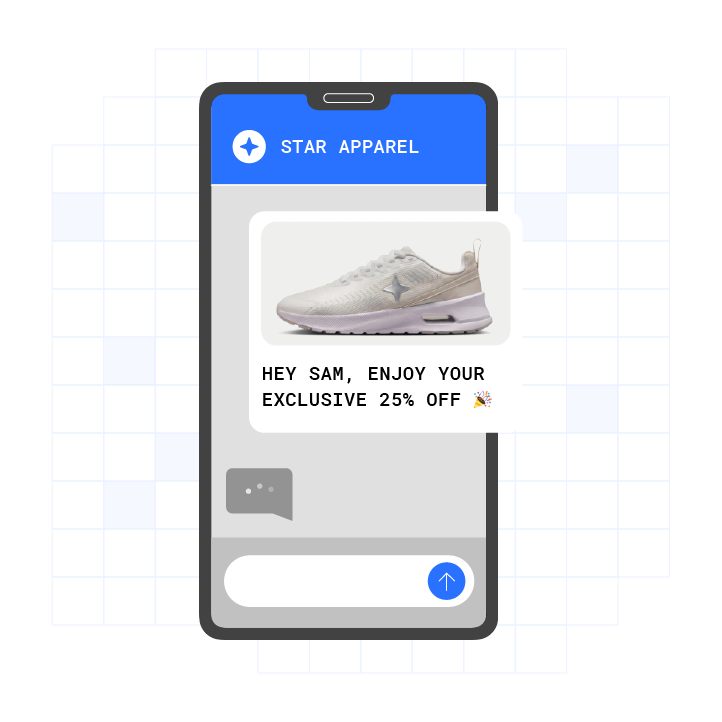
The thread itself looks different from a plain SMS thread. Raw URLs, truncated sender IDs, and plain gray bubbles are all absent. On iPhone, RCS messages appear in green text bubbles, the same color as SMS and MMS, which makes RCS and SMS visually indistinguishable to the recipient by bubble color alone. The content of the card, not the bubble color, differentiates the experience.
What Happens in an RCS Business Conversation, Step by Step
From the customer’s side, an RCS business conversation unfolds in five visible stages. Each stage reflects something the recipient sees or taps on screen.
- The message arrives from a verified sender. The customer sees the brand name, logo, and verification indicator in the conversation header, not a raw phone number.
- The rich card renders. Media, headline, description, and a suggested action appear together in one element inside the thread.
- The customer taps a suggested reply or suggested action rather than typing. Suggested actions can be clicked multiple times, while suggested replies can be clicked only once.
- The thread updates in place. A typing indicator appears, then the next card or confirmation message follows.
- The action completes inside the thread. Tracking, checkout, booking, or handoff resolves without redirecting the customer to a separate app, and read receipts confirm the customer saw the message.
Google’s RCS for Business documentation defines five suggested action types: Open URL, Dial Number, View Location, Share Location, and Create Calendar Event. Each action hooks into a native device capability directly from the message thread.
See these five elements rendered in a real thread.
RCS Business Messaging Experiences by Use Case
Transactional: Order Confirmation With a Tracking Action
The customer receives a message from a verified sender header showing the retailer’s name and logo. A rich card renders with the order image, a headline confirming the order number, and a “Track Order” suggested action button. For Open URL suggested actions, the underlying URL is displayed as a second line of text inside the suggestion button to build user trust. The customer taps once, and the carrier’s tracking page opens in the browser. The customer never leaves the thread to log in, download an app, or copy a tracking number.
The business sees a read receipt confirming the message was opened. Delivery receipts for RCS progress through SENT, DELIVERED, and READ statuses posted to the business’s webhook. That progression is a native RCS capability that SMS does not provide.
Conversational Commerce: Product Carousel and In-Thread Checkout
The customer sees a horizontally scrollable carousel of product cards. Each card carries its own image, title, description, and a CTA button. Google’s RCS for Business documentation describes carousels as ideal for browsing or comparing multiple items, and advises that the first item in a carousel should be the optimal choice, with the reasoning for that choice communicated to the user. A carousel must contain at least 2 and at most 10 cards, each following the same object structure as a standalone rich card.
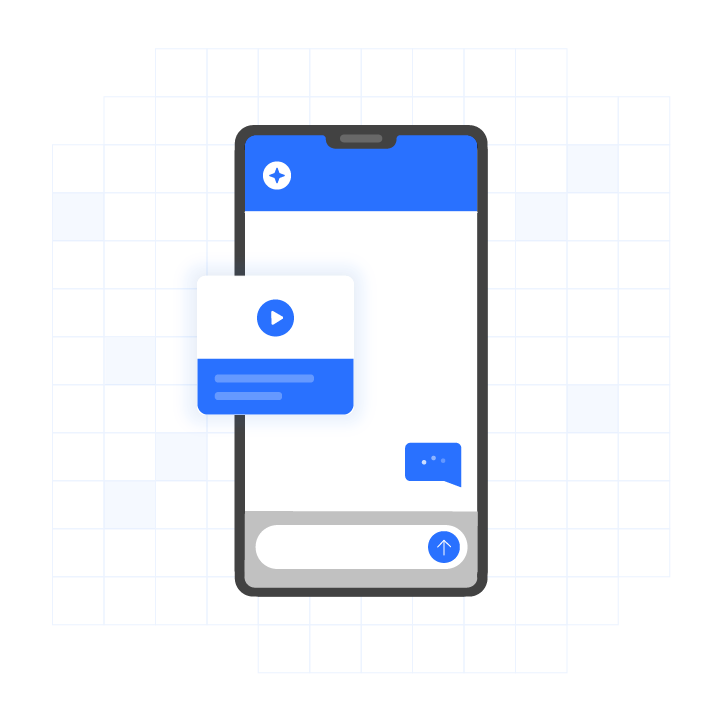
The customer swipes through the cards, taps a CTA on the product they want, and completes the action inside the thread. Plura AI’s AI RCS messaging delivers a 35% click-through rate and an 80% read rate, which reflects the difference between a tappable card and a plain-text link.3
Appointment Booking With Suggested Replies
The customer sees a card presenting available appointment times. Each time slot appears as a suggested reply button. The customer taps one slot. Tapping a suggested reply sends the postback data back to the business and can be clicked only once, so the booking is confirmed in a single tap with no ambiguity about double-selection. A confirmation card renders immediately in the same thread. Each suggestion has a maximum of 25 characters, which keeps button labels short and scannable on any screen size.
For operators running appointment-heavy workflows, Plura supports RCS-powered reminders and confirmations that can help reduce no-shows.
Support Conversation With Human Handoff
The customer sees a support card with suggested replies covering the most common issues. They tap the relevant option. The postback fires, the AI processes the request, and a typing indicator displays a typing animation in the user’s messaging app while the response is being prepared. If the issue requires a human agent, the thread stays open. The same conversation thread carries the warm handoff, and the human agent inherits the full context of what was already tapped and said.
Brand Verification and the Verified Sender Badge
The verified sender badge appeared earlier as the top element of the thread. It deserves a closer look because it often determines whether a customer opens the message at all. The RCS Business Messaging agent carries a name, logo, description, and contact information that appear in the user’s messaging app conversation thread. The customer sees the brand before they open the message.
That visibility changes behavior. Sinch’s research found that nearly 80% of consumers say visual indicators like a logo or checkmark make them more likely to trust a sender.4 A Datos Insights study on financial services trust found that 88% of consumers trust a message more if it is displayed with a verified company badge.4 The badge functions as the mechanism that converts a suspicious-looking notification into a tapped interaction.
RCS Business Messaging on iPhone vs. Android
Using RCS messaging on an iPhone requires iOS 18 plus a cellular plan from a carrier that supports RCS messaging on iPhone, and availability varies by region and carrier. End-to-end encrypted RCS messaging in beta requires iOS 26.5 plus a supported carrier, is enabled by default, and will roll out over time.
That encryption distinction matters for business senders. Personal (P2P) RCS messages are end-to-end encrypted via Universal Profile 3.0 using the MLS protocol, while business (A2P) RCS messages are encrypted in transit and platform-processed for delivery, analytics, and fallback, not end-to-end encrypted. The personal-chat encryption model does not extend to brand-to-consumer messaging on any carrier.
RCS messages appear in green text bubbles on iPhone, just like SMS and MMS. On iPhone, the visual treatment matches SMS, so bubble color does not signal channel. What differs is the control layer. Apple provides a dedicated RCS Business Messages toggle under Settings > Apps > Messages > RCS Messaging, which allows users to control alerts and updates from businesses. On the Android side, the client landscape is consolidating. Android RCS is consolidating onto Google Messages: AT&T is retiring its Advanced Messaging RCS in July 2026, and Samsung is discontinuing the Samsung Messages app in July 2026, making Google Messages the only Android RCS client on US networks.5
As of June 2026, 24 US networks and brands support RCS, including AT&T, Verizon, T-Mobile, Boost Mobile, Cricket, Mint Mobile, and Xfinity Mobile. For business senders, the practical implication is straightforward. The iPhone experience and the Android experience render the same verified sender badge, rich card, and suggested replies. The bubble color differs, while the interactive experience remains aligned.
What Happens When RCS Is Not Supported
Fallback runs automatically and per recipient. Before delivery, the platform runs a live capability check on each destination number, routing RCS-capable phones to the branded rich version and all others to the same message as SMS or MMS. The sender does not segment the list manually, because the platform routes per recipient.
If a business sends an RCS message to a user whose device does not support RCS or does not have RCS enabled, the RCS for Business platform returns a 404 NOT_FOUND error, and the sender can then attempt to reach the user through fallback methods defined in their own infrastructure. Message expiration via TTL fields can serve as a cue to invoke a fallback messaging strategy so users receive time-sensitive information on time through another channel.
When a rich RCS card degrades to SMS, the fallback version must carry the same intent in plain text. The core message survives and any suggested action becomes a link. Write the SMS version as a real standalone message, such as “Your order shipped. Track it: [link],” rather than leaving the action silently removed. Buttons and quick replies are not supported in SMS and are automatically removed in fallback.
The SMS leg of an RCS fallback rides a registered 10-digit long code, so a brand and campaign 10DLC (10-digit long code, the A2P SMS registration standard) registration must be in place for that leg to be deliverable.2 RCS verification and 10DLC registration are separate approvals, and both are required for an RCS-first program to work end to end. Consult qualified counsel or your messaging provider for guidance on registration obligations specific to your program.
Watch how fallback is handled on Plura’s own carrier infrastructure.
RCS vs. SMS vs. Apple Messages for Business: Experience Comparison
The table below compares the three channels across the attributes that shape what a customer sees and can do in the thread. Focus on media support, verified sender identity, in-thread actions, and device reach.
What to Measure in an RCS Business Messaging Experience
The primary metric in an RCS thread is completion inside the thread. A customer who taps “Book Appointment” and receives a confirmation in the same thread has completed the action. A customer who taps a link, lands on a mobile web page, and abandons the form has not.
Delivery receipts for RCS progress through SENT, DELIVERED, and READ statuses posted to the business’s webhook. The READ status mentioned earlier is the first of three signals worth tracking. The second is tap-through on suggested replies and suggested actions, which tells the operator which options customers actually chose rather than just whether the message was opened. The third, and the one that connects RCS experience design to business outcomes, is in-thread completion rate, defined as the share of recipients who finished the intended action without leaving the thread.
Why Plura AI for RCS Business Messaging Experiences
Plura AI is its own FCC-licensed audio bridging carrier. RCS runs on infrastructure Plura operates directly, not on a third-party CPaaS (Communications Platform as a Service). That distinction matters for three reasons. Branded sender identity is issued at the carrier level. Compliance enforcement happens inside the platform before any message leaves the network. The per-message economics reflect carrier-direct rates rather than reseller margins.
RCS on Plura runs alongside AI Voice, AI SMS, and AI Webchat on one Stateful Conversation Database. A customer who received an RCS order confirmation at 9 a.m. is the same customer when the support call comes at noon. The agent inherits the full context of every prior touchpoint across every channel.
Plura’s platform supports TCPA compliance, DNC compliance, HIPAA, SOC 2, ISO certification, GDPR, and SHAKEN/STIR caller ID verification.1 Real-time DNC scrubbing, TCPA-litigator screening, automated quiet hours, and immutable consent logging are enforced inside the platform on every outbound contact. All infrastructure is 100% U.S.-based by architecture. Plura supports customer compliance obligations; customers remain responsible for their own regulatory posture and certifications.
Plura connects to 50+ integrations across CRM, calendar, payment, and data enrichment categories. Every annual contract includes a 90-day opt-out window. The same RCS messaging also achieves 3x higher engagement compared to SMS across more than 2 billion supported devices.3
Compare plans and rates side by side.
Frequently Asked Questions
Do Businesses Use RCS Messaging?
US business RCS traffic grew from 494 million messages in 2024 to 3.2 billion in 2025, a growth rate of more than 500%, according to Juniper Research.3 Infobip reported that more than 1.5 billion RCS messages were delivered in the US in 2026 alone, with 7,300 unique brands onboarded to its platform. Financial services leads adoption at 49% current usage, with retail and e-commerce generating approximately 30% of all RCS business messaging revenue globally.
Should I Have RCS Business Messaging On?
On iPhone, the RCS Business Messages setting appears under Settings > Apps > Messages > RCS Messaging. Turning it off stops alerts and updates that businesses send about orders, appointments, and other transactions via RCS. Those messages would not be delivered through the RCS channel if the toggle is off. Whether to leave it on or off is a personal preference, and this article does not advise on that choice.
Why Would Someone Turn On RCS Messaging?
According to Apple’s support documentation, RCS on iPhone supports delivery receipts, read receipts, and typing indicators, and allows sending and receiving texts, high-resolution photos and videos, and links to both Apple and non-Apple devices. For business messages specifically, RCS delivers verified sender profiles, rich cards, carousels, and suggested reply buttons that plain SMS does not support.
How Does RCS Business Messaging Differ From SMS?
SMS delivers plain text only, up to 160 characters per segment, from a sender ID or phone number with no in-thread actions. RCS business messaging delivers verified sender identity with name, logo, and verification indicator; rich cards combining media, title, description, and interactive suggestions; horizontally scrollable carousels of up to 10 cards; suggested replies that send a postback in one tap; and five suggested action types including Open URL, Dial Number, View Location, Share Location, and Create Calendar Event. Read receipts are native to RCS and absent from SMS.
What Happens if a Customer’s Phone Does Not Support RCS?
The fallback process runs in sequence:
- The platform runs a live capability check per destination number before delivery.
- RCS-capable devices receive the branded rich version.
- Devices that cannot receive RCS receive the same message as SMS or MMS automatically.
- The rich card degrades to plain text, buttons and quick replies are removed, and the fallback copy carries the message intent as a standalone SMS with a link.
- According to Google’s RCS for Business documentation, if a device does not support RCS, the platform returns a 404 NOT_FOUND error and the sender’s infrastructure handles the fallback routing.
- The SMS leg requires a registered 10-digit long code, so 10DLC registration must be in place for that leg to be deliverable. Consult your messaging provider and qualified counsel for guidance on registration requirements specific to your program.
Does RCS Business Messaging Work on iPhone?
RCS business messaging works on iPhone from iOS 18 with a supporting carrier. According to Apple’s support documentation, RCS messaging on iPhone requires iOS 18 plus a cellular plan from a carrier that supports RCS on iPhone, and availability varies by region and carrier. The 24-network figure cited earlier covers the major US carriers. RCS messages appear in green bubbles on iPhone, visually identical to SMS by bubble color. Business (A2P) RCS messages are encrypted in transit, not end-to-end, on every carrier.
The Evaluation Criteria That Matter
RCS business messaging is sold in capability language, but buyers evaluate it in screen language. The gap between those two perspectives is where budget approvals often stall. The five on-screen elements, the verified sender badge, the rich card, the carousel, the suggested reply, and the in-thread action, are what to ask to see rendered before committing budget to any platform.
The evaluation criteria are straightforward. The platform should show the thread, not just a slide deck. It should handle fallback with a real SMS leg on a registered 10-digit number. It should run RCS on infrastructure it operates, not on a third-party CPaaS. It should hold conversation context across voice, SMS, RCS, and webchat so the customer never has to repeat themselves.
Those four criteria separate platforms that describe RCS from platforms that run it.
Compare plans and rates side by side.
1 Plura AI maintains SOC 2, HIPAA, ISO, and GDPR posture as part of its platform infrastructure. References to compliance frameworks in this article describe Plura’s platform capabilities and do not constitute a guarantee that any customer using Plura will themselves be compliant with applicable laws or standards. Customers remain solely responsible for their own regulatory obligations, certifications, consent management, recordkeeping, and the claims they make to their own end users. Consult qualified legal counsel for guidance specific to your use case.
2 This article describes regulatory frameworks at a general level and does not constitute legal advice. Laws and regulations vary by jurisdiction, change over time, and apply differently depending on facts and circumstances. Readers should consult qualified legal counsel before making compliance decisions.
3 Performance figures, customer outcomes, and industry statistics referenced in this article are drawn from cited third-party sources or Plura customer case studies. Individual results vary based on implementation, use case, industry, audience, and execution. Past or aggregate performance is not a guarantee of future results.
4 References to third-party products, services, companies, or research are made for informational and comparative purposes only. Plura AI is not affiliated with, endorsed by, or sponsored by any third party named in this article unless explicitly stated. Trademarks and product names referenced remain the property of their respective owners.
5 This article contains forward-looking statements regarding industry trends, technology adoption, and future capabilities. These statements reflect current expectations and are subject to change. Plura AI undertakes no obligation to update forward-looking statements except as required.
This article is provided for informational purposes only and reflects Plura AI’s understanding at the time of publication. Product capabilities, integrations, and specifications are subject to change. For the most current information, visit plura.ai.
This article was produced with the assistance of AI tools and reviewed by Plura AI prior to publication.